> ## Documentation Index
> Fetch the complete documentation index at: https://www.vozo.ai/docs/llms.txt
> Use this file to discover all available pages before exploring further.
# Voice Cloning Models
> Learn the difference between VoiceREAL and VoiceNATIVE.
## Overview
Vozo provides two voice cloning models in **Translate & Dub**:
* **VoiceREAL**
* **VoiceNATIVE**
Both models preserve the original speaker’s voice identity, but they are optimized differently.
| Feature | VoiceREAL | VoiceNATIVE |
| ------------------------------ | ---------------------------------------------------------- | --------------------------------------------------------------------------------- |
| Emotional delivery & tone | ★★★★★ | ★★★☆☆ |
| Natural target-language accent | ★☆☆☆☆ | ★★★★★ |
| Best for | Creator & personality-driven content | Explanatory & professional content |
| Recommended for | Short Drama, Vlogs, Youtuber videos, entertainment content | Ads, UGC ads, tutorials, e-learning courses, product explainers, corporate videos |
If you are unsure which model to use, select **Auto**. Vozo will automatically choose the most suitable model.
## How to Select a Model
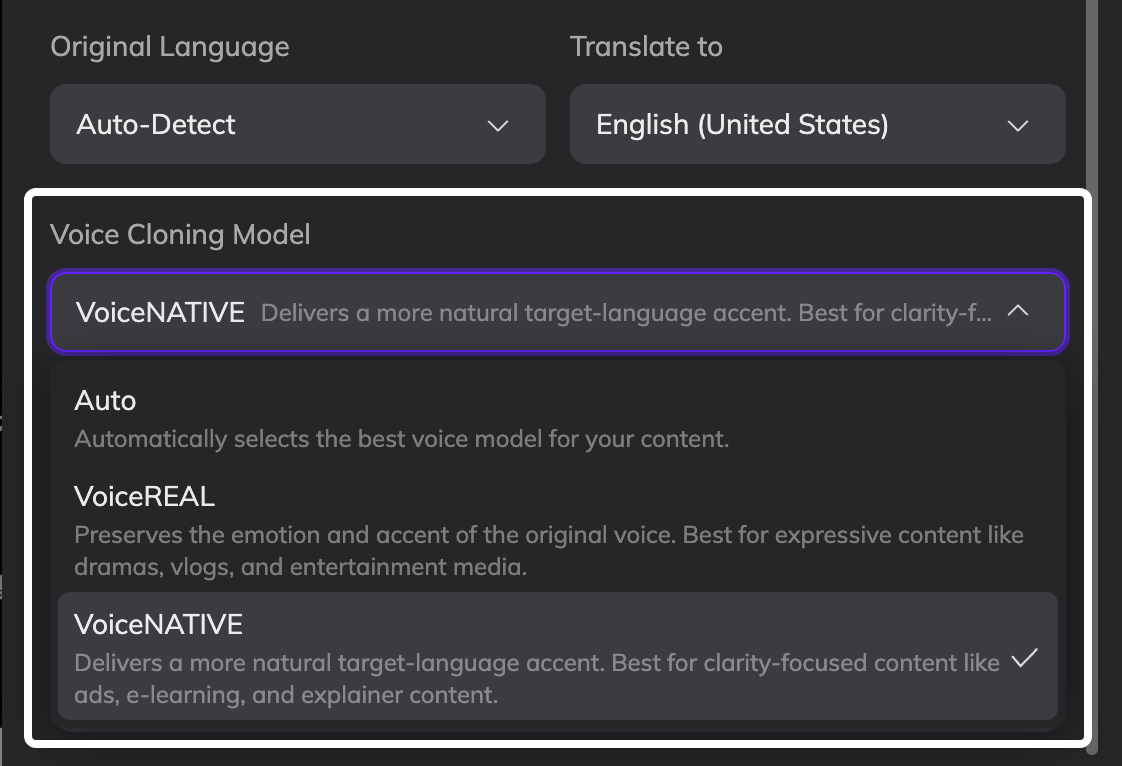
Before generation, select your preferred model under **Voice Cloning Model**.
 ## FAQ
No. The voice cloning model cannot be changed after generation.
When a project is created, the selected voice cloning model is written into the project configuration. All future generations and regenerations within that project will continue using the same model.
To use a different model, you need to:
1. Re-upload the video or audio
2. Select the correct voice cloning model
3. Submit a new translation project
Voice cloning models only apply to cloned voices.
If you select a system-provided preset voice from Voice Library, the voice will speak based on the languages and accents supported by that voice itself. It is not affected by the voice cloning model selected in your project.
If you select a voice that you previously cloned, the voice will generate speech using the voice cloning model selected in your current project.
Newly added languages will use the same voice cloning model used in the original project.
If the original project was set to **Auto**, the newly added languages will follow the model that Auto ultimately selected for that project.
For example, if the original project used **Auto** and Vozo determined that **VoiceREAL** was the most suitable model, then newly added languages will also use **VoiceREAL**.
If you want to use a different model for the new languages, please re-upload the video or audio and submit a new translation project.
For text translation, Vozo will use vocabulary, expressions, and speaking styles that match the selected regional variant.
However, for dubbing, VoiceREAL preserves the original speaker’s accent and vocal characteristics. The generated voice may still sound closer to the original speaker’s accent rather than a fully native British English accent.
If you want a more natural localized accent, we recommend using **VoiceNATIVE**.
## FAQ
No. The voice cloning model cannot be changed after generation.
When a project is created, the selected voice cloning model is written into the project configuration. All future generations and regenerations within that project will continue using the same model.
To use a different model, you need to:
1. Re-upload the video or audio
2. Select the correct voice cloning model
3. Submit a new translation project
Voice cloning models only apply to cloned voices.
If you select a system-provided preset voice from Voice Library, the voice will speak based on the languages and accents supported by that voice itself. It is not affected by the voice cloning model selected in your project.
If you select a voice that you previously cloned, the voice will generate speech using the voice cloning model selected in your current project.
Newly added languages will use the same voice cloning model used in the original project.
If the original project was set to **Auto**, the newly added languages will follow the model that Auto ultimately selected for that project.
For example, if the original project used **Auto** and Vozo determined that **VoiceREAL** was the most suitable model, then newly added languages will also use **VoiceREAL**.
If you want to use a different model for the new languages, please re-upload the video or audio and submit a new translation project.
For text translation, Vozo will use vocabulary, expressions, and speaking styles that match the selected regional variant.
However, for dubbing, VoiceREAL preserves the original speaker’s accent and vocal characteristics. The generated voice may still sound closer to the original speaker’s accent rather than a fully native British English accent.
If you want a more natural localized accent, we recommend using **VoiceNATIVE**.