

Inputs
Media and languages
Subtitle text sources
Use these fields if you have original or translated subtitle text to provide. Otherwise, you can ignore this section.Translation and dubbing
Use these fields to customize translation and dubbing models, settings, or requirements. Otherwise, you can ignore this section.| Field | Values | Requirement | Description |
|---|---|---|---|
speaker_number | { min, max } | Optional | Specifies the expected speaker-count range. min must be at least 1 and max cannot exceed 35. Omit it for automatic detection. |
voice_model | auto, real, native | Optional | Selects the voice cloning model used for dubbing. Defaults to auto: auto automatically selects the best model for your content; real uses VoiceREAL to preserve the emotion and accent of the original voice; native uses VoiceNATIVE to deliver a more natural target-language accent. |
selected_voice_id | String | Optional | Uses a specific voice from the Voice Library in the Vozo web app for dubbing. When this field is provided, it overrides voice_model: the API skips automatic voice cloning and uses the selected voice to generate the dubbed audio.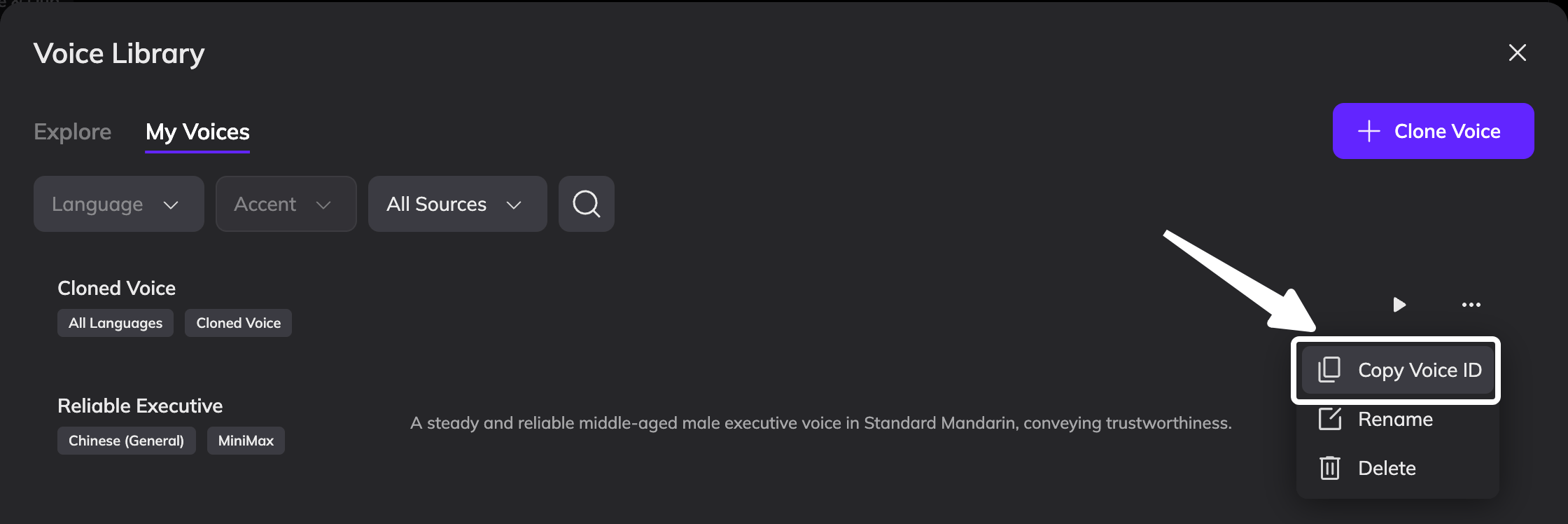 |
align_video | Boolean | Optional; video only | When set to true, automatically adjusts the video speed so the translated audio and video remain synchronized throughout. Defaults to false. Set it to false if the translated audio will be used as an additional audio track on YouTube. |
glossary_ids | Array of up to 3 IDs | Optional; Studio plan or higher required | Applies glossaries created in the Vozo web app to keep terminology consistent.  |
user_prompt | String | Optional | Provides translation or dubbing instructions, such as tone, style, or terminology preferences. |
Subtitle output
Use these fields if you want to add translated subtitles to the video or erase and replace existing subtitles. Otherwise, you can ignore this section.| Field | Values | Requirement | Description |
|---|---|---|---|
subtitle_mode | none, add, replace | Optional | Controls subtitle rendering: do not render subtitles, add translated subtitles, or erase existing subtitles before rendering translated subtitles. Defaults to none. |
subtitle_style_id | String | Optional; applies with add or replace | Applies a subtitle style copied from a project in the Vozo web app. If omitted, the built-in default subtitle style is used. 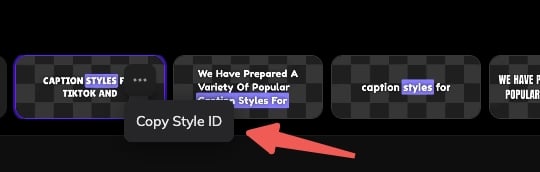 |
subtitle_position_y | Number from 0 to 1 | Optional; applies with add or replace | Sets the vertical subtitle position, from the top (0) to the bottom (1). For example, 0.75 places subtitles at 75% of the video height. See the positioning rules below. When enable_proofreading is true and subtitle_mode is replace, this field has no effect. |
If
subtitle_style_id is omitted, the built-in default style is used. It displays a single centered line using white Noto Sans Medium text at font size 14, an outside black stroke, and a subtle black shadow. The caption width is 80% of the video, with no background, active-word effect, or transition.If subtitle_position_y is omitted, its value does not come from the selected subtitle style. The position is determined by subtitle_mode:- For
add, the default is0.9for landscape and square videos, and0.75for portrait videos. - For
replace, subtitles are placed at the original subtitle position.
enable_proofreading is true and subtitle_mode is replace, the subtitle position remains at the region where the original subtitles were erased after dubbing is completed in the project. Any value specified in subtitle_position_y is ignored.Project and output
Outputs
(depending onexport_type, project_mode, and enable_proofreading):
- translated video and/or audio URL
- translated
subtitle_url(SRT) project_urlwhen a web dashboard project is created
How it works
1
Host your assets at a publicly accessible URL
Upload your video or audio, along with any optional assets, so our servers can retrieve them.
2
Send an API request
Provide the required inputs and any optional settings needed for the job.
3
Wait or query status
Use our webhook callback or poll the API with your task ID until processing is complete.
4
Download outputs
Retrieve translated video/audio and the translated subtitle (.srt) from the provided URLs.
Usage Limitation
- Only users who can create API Keys may use this API.
- The default concurrency limit is 10 jobs. The limit is shared by all members of a team. See Concurrency limits for details.
- Language code follows IETF BCP 47 standard, e.g., en‑US.