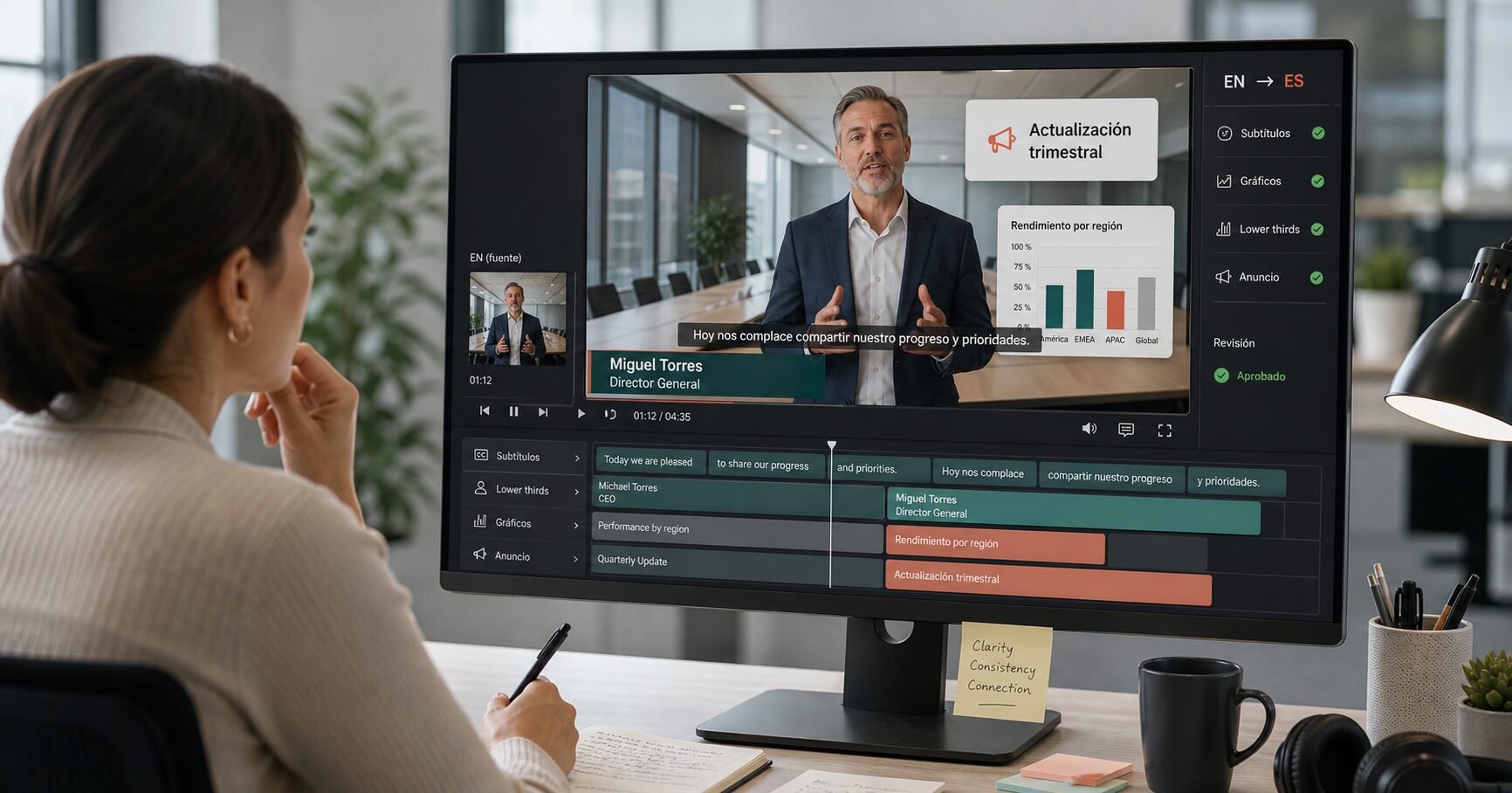

An internal communication video can carry several messages at once. A CEO speaks, subtitles reproduce the speech, a lower third identifies the speaker, and charts present supporting information. Department names, dates, locations, and next steps may also appear inside the frame. If a global team translates only the audio or subtitles, employees may hear one language while still having to read another.
Across company notices, corporate presentations, project introductions, and enterprise brand films, important information often appears inside the frame as titles, lower thirds, charts, labels, and calls to action. That practical pattern is why internal communication video localization cannot stop at audio or subtitles.
Internal communication video localization should therefore be planned as a layered workflow. Spoken language, captions, and on-screen text need separate handling, followed by one coordinated review. The aim is not to make every regional version mechanically identical. It is to preserve the same approved message, supporting information, and requested action across languages.

What Are Internal Communication Videos?
Internal communication videos are videos an organization uses to share company information with its existing workforce. Typical subjects include leadership messages, organizational changes, company announcements, business updates, town hall recaps, and employee recognition. Their purpose is to keep employees informed and aligned, rather than teach a defined skill or operating procedure.
That boundary matters for this article. An announcement explaining that a policy is changing is internal communication. A module teaching employees how to follow the new policy is training. A leadership update about a new system is internal communication; a screen-recorded tutorial showing every button in that system is onboarding or product instruction. Keeping those jobs separate prevents the localization brief from expanding into a mixture of announcements, courses, SOPs, and compliance material with different review requirements.
Research on multinational organizations gives a sound reason to take language seriously without overstating the case. A large study covering more than 800 subsidiaries found substantial differences in language competencies, policies, and practices across multinational companies. Other organizational research has documented communication avoidance when employees are expected to use a corporate language in which they are less comfortable. These findings do not prove that translating one video will improve a specific business metric. They do support a narrower conclusion: choosing one corporate language does not guarantee that every employee can process the same message with equal ease.
Six Internal Communication Video Types Global Teams May Need to Localize
The right priority depends on the organization’s workforce, distribution model, and message risk. The following six types are useful candidates because they carry organization-wide information and often contain visible text as well as speech.
- CEO video messages. A CEO video message may combine direct-to-camera speech with a name and title, strategic themes, dates, business figures, or a closing statement. Those visual elements need to agree with the translated voice and subtitles.
- Leadership and executive updates. Functional leaders may report on priorities, market changes, quarterly progress, or cross-regional initiatives. Slides, charts, business-unit names, and location labels can carry as much detail as the speaker.
- Company announcement videos. Announcements about organizational changes, milestones, new offices, partnerships, or major projects often use branded titles and concise on-screen summaries. The wording may require approval from communications, HR, legal, or another content owner.
- Change communication videos. These explain what is changing, why it matters, when it takes effect, and where employees can find more information. They should not drift into training unless the video actually teaches a new process.
- Town hall recaps. A recorded town hall can be long and discussion-heavy, while a recap usually selects the decisions, figures, questions, and next steps employees need afterward. Localization should follow the approved recap rather than treating every informal remark as an equally durable message.
- Culture and employee recognition videos. These may include employee names, roles, office locations, quotes, awards, and campaign language. Names and protected brand wording should be distinguished from text that needs translation.
These are scenario examples, not claims that every organization needs six separate formats. A useful content inventory starts with the videos already distributed across language groups and the information employees are expected to retain or act on.
Why Global Internal Communications Need More Than Subtitles
Subtitles represent spoken language as timed text. They do not automatically translate words already embedded in the picture. The distinction is easy to miss because both appear on screen, but they belong to different production layers.
In a CEO message, subtitles may translate the speech while the executive’s title remains in the source language. In a business update, the narration may describe regional performance while the chart headings and legends remain unreadable to part of the audience. In a company announcement, the new date, location, project name, or next step may appear only in a graphic. None of these issues means subtitles are unimportant; it means visual translation cannot be replaced by subtitle translation alone.
The visual layer also affects interpretation. A number without its unit or chart label is ambiguous. A translated department name that differs between the subtitle and lower third creates avoidable uncertainty. A long target-language phrase squeezed into a narrow title area may be technically present but practically unreadable. The correct scope is determined by the role each element plays in the scene, not by whether it is classified as audio, subtitle, or design.
What Should Be Localized in an Internal Communication Video?
Before translating, review the full video and separate its language into three connected layers. This prevents a team from assuming that one transcript, export, or review covers everything.

Spoken layer
This includes narration, interviews, audience questions, and other recorded speech. Depending on the audience and channel, the localized version may use subtitles, voice-over, dubbing, or a combination. The method affects timing, speaker identification, and how much attention viewers can give to charts or other visual information.
Caption layer
Captions and subtitles need accurate segmentation, timing, names, numbers, and terminology. They should also be checked against the localized audio. A correct translation can still confuse viewers if it appears after the relevant chart or remains on screen after the next speaker begins.
Visual text layer
This is text rendered inside the video image: opening titles, executive names and roles, lower thirds, chart legends and data labels, dates, figures, department and project names, process diagrams, interface labels, notifications, and end-screen instructions. These elements need to be reviewed in their visual context, not extracted as an unrelated word list.
Not every visible word should be translated automatically. A company name may stay fixed while a job title changes. A project name may have an approved English form across all markets while the explanatory line beneath it is localized. The content owner should define those rules before production, especially when several regional reviewers are involved.
How to Localize Internal Communication Videos Step by Step
1. Confirm the audience, purpose, and source version
Start with the people who will receive the message, the languages they use, and the channel where the video will appear. An intranet announcement for employees in one country has a different review path from a global leadership video published across several regional portals. Confirm that the source is final before translation begins; otherwise, teams may approve several language versions of a message that has already changed.
Also identify the owner of the message. Corporate Communications may own the narrative, but HR may need to approve role or policy terminology, Finance may own reported figures, and Legal may need to review a sensitive announcement. Localization should preserve these ownership boundaries rather than create a parallel approval process.
2. Inventory the scenes and prepare terminology
Work through the final video scene by scene. Record speech, subtitles, visible text, speaker labels, charts, dates, and elements that should not be altered. A transcript cannot reveal that a bank notice contains an embedded deadline, a real-estate introduction uses location labels, or a smart-city presentation displays project phases inside a graphic. Those structures are invisible in a transcript and require scene-by-scene visual inspection.
Build a compact terminology sheet covering company and project names, executive titles, departments, strategic phrases, abbreviations, and terms that stay in the source language. If the same theme appears in the voice, subtitle, title card, and closing frame, all four should use the approved wording.
3. Choose the right treatment for each layer
The message and distribution context determine whether the new version needs subtitles or dubbing, voice-over, or a combination. A short leadership update may work with localized subtitles, while a longer message for employees who are not comfortable reading the corporate language may justify a translated voice track. This is an editorial and operational choice, not a universal hierarchy in which one method is always better.
On-screen text requires a separate decision. Editable source files allow designers to replace text directly. When the team has only the exported video, the visual text needs to be detected, translated, removed from the original frame, and rebuilt in the target language. Either route still requires review for meaning, layout, and timing.
4. Translate voice, subtitles, and visuals in context
The translator should be able to see the scene, not only a detached string. A short phrase such as “Next quarter” may be a chart heading, a spoken transition, or an action deadline; each context can require different wording. Speaker titles also need organizational context because literal equivalents do not always match the company’s approved role names.
Context is equally important when the source contains figures. Translators should not independently convert currencies, dates, units, or reported values unless the content owner has approved that policy. The goal is to preserve the authorized message, not silently adapt business information based on assumption.
5. Rebuild and review the visual layer
Translated text often expands or contracts, so teams may need to rebuild the visual layer for the target language. A lower third that fits in English may wrap awkwardly in German, while a short Chinese title may require more horizontal space in Spanish.
Do not solve every fit problem by shrinking the type. If the text becomes hard to read, revise the layout or agree on a shorter approved form. Charts and labels also need positional review: a translation can be linguistically correct but visually wrong if it overlaps a data point, points to the wrong region, or obscures an executive’s face.
6. Approve the rendered video and retain a version trail
One reviewer rarely owns every decision. A language reviewer checks accuracy and fluency; the message owner checks names, terminology, dates, figures, and meaning; visual QA checks placement, readability, and timing. They should watch the rendered video because a spreadsheet cannot show a subtitle colliding with a lower third or a label covering a chart.
Store the source version, target language, glossary, approvals, export date, and publication destination together. When the message changes, this record helps teams identify the language assets that must be replaced.
How to Translate On-Screen Text Without Original Project Files
The absence of an After Effects, Premiere Pro, or design source file changes the video localization method, but it does not remove visual text from the project scope. Teams still need to identify each text region, determine what can be translated, remove or cover the source wording, rebuild the target text, and review the result in motion.
This route works best when the required text is legible and can be separated from its background. Moving cameras, complex textures, text hidden behind objects, stylized typography, and very brief appearances can require more manual review. Logos, legal marks, and text embedded in detailed interfaces should also be assessed individually rather than replaced automatically.
Localize the Visual Layer with Vozo Visual Translate
Vozo Visual Translate is built for this visual layer. According to the current product documentation, it detects and translates on-screen text such as slides, titles, labels, captions, and explanatory overlays, then rebuilds the translated text while preserving layout, style, and animations. It accepts an uploaded video, so the workflow does not require the original project file. Users can proofread detected and translated text before export.

Visual Translate focuses on what appears inside the frame rather than the spoken audio. For a complete localized internal comms video, teams can finish the visual layer and then continue with the appropriate subtitle, dubbing, or lip-sync workflow. Product output still needs the same language, content, and visual approval described above; automation changes the production work, not the ownership of the message.

Localization Priorities by Internal Video Type
Different video types concentrate risk in different places. This table is a starting point for assigning review responsibility, not a substitute for the organization’s own approval policy.
| Video type | Highest-priority elements | Likely review owner |
|---|---|---|
| CEO or leadership message | Voice, name, title, subtitles, closing message | Corporate Communications |
| Company announcement | Dates, locations, department names, requested action | Communications and subject owner |
| Change communication | Program terms, team structures, timelines, diagrams | Change or program owner |
| Town hall recap | Speaker labels, slide headings, figures, action items | Communications and regional reviewers |
| Business update | Figures, charts, reporting periods, business units | Finance or business owner |
| Culture or recognition video | Names, roles, locations, quotes, campaign language | Internal Communications or HR Communications |
A Localization Checklist for Internal Communications Teams
Before an internal communication video is distributed, confirm that:
- The audience, language variant, source version, and message owner are documented.
- Speech, subtitles, titles, lower thirds, charts, labels, dates, and next steps have been inventoried.
- Executive names, job titles, departments, and project names use approved forms.
- Spoken, subtitled, and visible terminology agrees within each scene.
- Figures, dates, units, currencies, and URLs match the authorized source or approved localization policy.
- No meaningful source-language text remains unintentionally inside the frame.
- Translated text is readable and does not cover a speaker, chart, label, or other important visual.
- Language, content, and visual reviewers have watched the rendered version.
- The localized file can be traced to its source and removed or updated when the message changes.
This checklist is deliberately separate from training assessment. It verifies whether an organizational message has been transferred accurately and presented clearly; it does not evaluate learning objectives, course completion, or procedural competence.
Keep the Whole Message in the Target Language
Internal communications translation works best when the video is treated as a connected message rather than an audio file with decoration around it. A CEO speaks, but the lower third establishes the speaker’s role. A leader explains a result, but the chart defines the period and category. An announcement names a change, but the closing frame tells employees when it begins and where to go next.
For global teams, the practical workflow is straightforward: confirm the approved source, map every meaning-bearing layer, translate connected elements together, and review the rendered result. When the source project is unavailable, visual translation provides a way to work directly with the on-screen text in the finished video instead of leaving that layer behind.
Frequently Asked Questions
What is an internal communication video?
An internal communication video is a video used to share organizational information with existing employees. Common examples include CEO messages, leadership updates, company announcements, change communications, town hall recaps, and employee recognition. It differs from training content because its main job is to communicate company information rather than teach a defined skill or procedure.
How do you translate internal communication videos?
Start by confirming the audience and final source, then inventory the speech, subtitles, titles, lower thirds, charts, dates, and other visible text. Translate those connected elements with a shared terminology sheet, rebuild the visual layer where necessary, and conduct separate language, content, and visual reviews before publishing.
Are subtitles enough for multilingual internal communications?
Subtitles may be enough when the spoken message contains all essential information and the remaining visuals are language-neutral. They are not enough when employees also need to read speaker titles, chart labels, announcement dates, department names, or instructions embedded in the frame.
How do you translate text embedded in a corporate video?
If editable project files are available, the design team can replace the text in the source composition. If only the finished video is available, a visual translation workflow can detect text regions, translate the wording, remove the source text, and rebuild the target-language layer. The rendered result should still be checked for terminology, readability, placement, and timing.
Can a corporate video be localized without its original project files?
Yes, on-screen text can be processed from an uploaded finished video with a tool designed to detect and rebuild visual text. The feasibility and final quality depend on the video, text movement, background complexity, and review process, so teams should test representative scenes before committing a large library.
What should be checked in a localized CEO video message?
Check the executive’s name and title, approved strategic language, dates and figures, subtitle and voice consistency, lower-third layout, visible charts or key points, and the closing action or destination. Sensitive messages may also require review from Communications, HR, Finance, Legal, or another designated owner.
