

Introducción
Actualizado en junio de 2026.
¿Buscas una extensión de Chrome para traducir vídeos o un traductor de subtítulos de YouTube? En esta guía se comparan las extensiones de navegador que permiten traducir subtítulos, subtítulos ocultos y páginas de vídeo, incluyendo herramientas para la traducción de subtítulos de YouTube, subtítulos en tiempo real, el aprendizaje de idiomas y el doblaje básico. Si necesitas subtítulos editables y listos para exportar en lugar de solo subtítulos traducidos en pantalla, una herramienta específica Traductor de subtítulos con IA es más adecuado.
También explicamos en qué aspectos se quedan cortas las extensiones de Chrome y cuándo es mejor una solución completa AI traductor de vídeo una herramienta como Vozo es la mejor opción.
¿Qué es un traductor de subtítulos de vídeo?
Un traductor de subtítulos de vídeo es una herramienta que traduce los subtítulos de los vídeos. La mayoría de las extensiones de Chrome para traducir subtítulos de vídeo funcionan mejor cuando el vídeo ya cuenta con subtítulos, audios o transcripciones disponibles. Son útiles para ver tutoriales de YouTube, cursos en línea y vídeos en idiomas extranjeros, pero normalmente no crean un vídeo totalmente localizado con doblaje traducido, clonación de voz, sincronización labial o subtítulos multilingües editables.
Respuesta rápida: ¿Cuál es la mejor extensión de Chrome para traducir vídeos de YouTube?
Para traducir los subtítulos de YouTube, Video CC Translator y Video Translator son las extensiones de Chrome más adecuadas. Para subtítulos en tiempo real y reuniones, iTour Video Translation y Maestra son opciones más sólidas. Para el aprendizaje de idiomas, Language Reactor es la mejor opción.
Para creadores, profesionales del marketing, educadores y equipos que necesitan publicar vídeos traducidos, Vozo es la mejor opción. Para equipos de localización y flujos de trabajo de producción orientados al cliente, consulta la solución de Vozo Plataforma de localización de vídeos basada en IA para agencias. A partir de junio de 2026, Traductor de vídeo Vozo Ofrece compatibilidad con más de 160 idiomas, subtítulos editables, doblaje con IA, clonación de voz y sincronización labial precisa en un flujo de trabajo completo de localización de vídeos.
Los YouTubers que quieran ampliar su audiencia a nivel mundial pueden utilizar un Flujo de trabajo para la localización de vídeos de YouTube en lugar de limitarse a utilizar extensiones de Chrome basadas en subtítulos.
Cómo hemos seleccionado estas extensiones de Chrome para traducir vídeos
Evaluamos cada herramienta basándonos en cinco criterios prácticos:
- Tipo de traducción: traducción de subtítulos, subtítulos bilingües, transcripción en tiempo real o doblaje con IA.
- Compatibilidad con plataformas: compatibilidad exclusiva con YouTube frente a una compatibilidad más amplia con reuniones, cursos y otros sitios de vídeo.
- Cobertura lingüística: el número de idiomas de origen y de destino admitidos.
- Calidad del resultado: sincronización de los subtítulos, precisión de la traducción, naturalidad de la voz y calidad de la sincronización.
- Privacidad y control del flujo de trabajo: permisos de las extensiones, gestión de datos, opciones de exportación y si el resultado es apto para su publicación.
| Herramienta | Lo mejor para | Señal actual de la tienda web | Tipo de traducción | Limitación principal |
|---|---|---|---|---|
| Video CC Traductor | Títulos de los cursos en YouTube, Udemy y Udacity | Puntuación de 3,6, más de 60 000 usuarios | Traducción de subtítulos en CC | Requiere subtítulos |
| Traductor de vídeo | Traducción de vídeos a partir de la URL | Puntuación de 3,0, más de 80 000 usuarios | Traducción de vídeo y voz | Calificación baja; se debe comprobar la calidad |
| iTour Traducción de vídeos | Subtítulos en tiempo real para vídeos y reuniones | Puntuación de 4,9, más de 50 000 usuarios | Subtítulos de audio y vídeo en tiempo real | No es para vídeos localizados listos para la exportación |
| Maestra | Transcripción y subtítulos en el navegador | Valoración de 3,7, más de 8 000 usuarios | Transcripción y subtítulos en tiempo real | Flujo de trabajo de pago; no es principalmente una herramienta de doblaje |
| Reactor lingüístico | El aprendizaje de idiomas en YouTube/Netflix | Puntuación de 4,2, más de 2 millones de usuarios | Subtítulos en dos idiomas / Herramientas de aprendizaje | No es para creadores ni editoriales |
| Traductor de YouTube y doblaje de vídeos de YouTube | Traducción de YouTube basada en los subtítulos | Valoración de 2,0, más de 70 000 usuarios | Funciones de subtítulos y doblaje de YouTube | Requiere subtítulos de YouTube; baja valoración |
| SubTrans | Subtítulos bilingües en todas las páginas web | Puntuación de 3,9, más de 40 000 usuarios | Traducción de subtítulos | Requiere subtítulos oficiales o subtítulos externos |
| DeepL | Traducción de textos y subtítulos | Valoración de 4,7, más de 4 millones de usuarios | Traducción de texto/página | No es un traductor de vídeos completo |
| Traductor de vídeo Vozo | Publicación de vídeos traducidos | Más de 160 idiomas, flujo de trabajo completo | Traducción con IA, doblaje, subtítulos, clonación de voz, sincronización labial | No es una extensión de Chrome |
1. Video CC Translator: la mejor extensión de Chrome para traducir subtítulos de vídeo

Lo mejor para:
Estudiantes que necesitan subtítulos traducidos para cursos y clases en línea.
Video CC Translator se centra en la traducción de subtítulos en tiempo real. Según su ficha en la Chrome Web Store, es compatible con Udemy, Udacity y YouTube, y puede traducir subtítulos utilizando Google Translate y DeepL. Además, admite el modo de pantalla completa, el ajuste de la posición de los subtítulos y estilos de subtítulos personalizables.
Datos clave a junio de 2026:
| Característica | Detalles |
| Clasificación | 3,6/5 a partir de 181 valoraciones |
| Usuarios | 60,000+ |
| Versión | 2.5.6 |
| Plataformas compatibles | Udemy, Udacity, YouTube |
| Lenguajes de interfaz de extensiones | 11 idiomas |
| Privacidad | El desarrollador afirma que no recopila ni utiliza datos |
| Tienda web | Video CC Traductor |
Pros:
- Ideal para la traducción de cursos basados en subtítulos
- Funciona con Udemy, Udacity y YouTube
- Permite personalizar el estilo y ajustar la posición de los subtítulos
- Utiliza Google Translate y DeepL
Limitaciones:
- Depende de si hay subtítulos disponibles
- No está diseñado para el doblaje con IA ni para la clonación de voces
- No es adecuado para la producción de vídeos localizados destinados a su publicación
Veredicto:
Utiliza Video CC Translator si lo que necesitas principalmente son subtítulos traducidos para los vídeos de tus cursos. Si necesitas publicar contenido formativo multilingüe, utiliza un flujo de trabajo de localización completo que incluya edición de transcripciones, doblaje con IA, subtítulos y revisión.
2. Video Translator: la mejor extensión sencilla de traducción de vídeos para YouTube
Lo mejor para:
Usuarios ocasionales que desean traducir vídeos a partir de direcciones URL sin tener que crear un flujo de trabajo de localización completo.
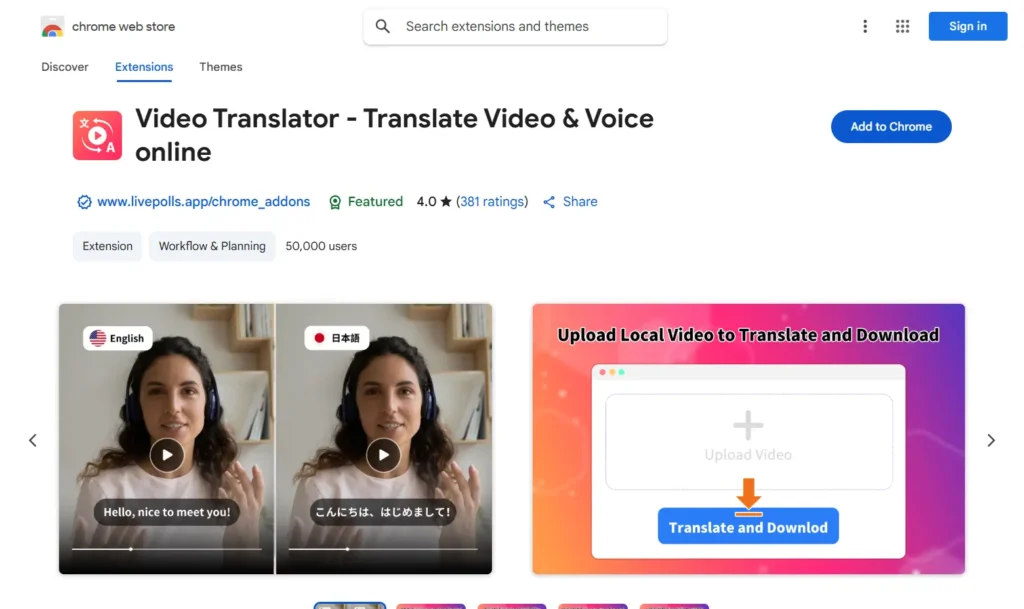
Video Translator – Translate Video & Voice online se presenta como un traductor de vídeo y voz basado en IA. Según su ficha en la Chrome Web Store, puede traducir vídeos a más de 100 idiomas y admite enlaces de vídeo de plataformas como Facebook, Instagram, Twitter, Vimeo, TikTok, Reddit y otros sitios web. Sin embargo, su valoración actual en la Chrome Web Store es inferior a la de varias alternativas, por lo que debería presentarse como una opción básica en lugar de como una opción profesional de primer nivel.
Datos clave a junio de 2026
| Característica | Detalles |
| Clasificación | 3,0/5 a partir de 226 valoraciones |
| Usuarios | 80,000+ |
| Versión | 4.8.10 |
| Cobertura de traducción declarada | Más de 100 idiomas |
| Lenguajes de interfaz de extensiones | 54 idiomas |
| Privacidad | El desarrollador afirma que no recopila ni utiliza datos |
| Tienda web | Traductor de vídeo |
Pros:
- Funciona con enlaces de vídeo de múltiples plataformas
- Va más allá de la simple traducción de los subtítulos de YouTube
- Útil para pruebas rápidas de traducción
Limitaciones:
- La Chrome Web Store tiene una valoración inferior a la de otras alternativas más sólidas
- Las afirmaciones sobre la calidad deben tratarse con cautela, a menos que se hayan sometido a pruebas independientes
- No es la opción ideal para equipos que necesitan revisión, subtítulos, control de modelos de voz y localización lista para exportar
Veredicto:
Utiliza Video Translator para realizar pruebas básicas de traducción basadas en URL. Para la localización profesional de vídeos, utiliza un flujo de trabajo que incluya transcripciones editables, subtítulos, doblaje con IA, clonación de voz y sincronización labial.
3. iTour Video Translation: la mejor extensión de traducción de vídeo en tiempo real

Lo mejor para
Estudiantes, alumnos en línea y participantes en reuniones que necesitan subtítulos traducidos en tiempo real mientras ven vídeos o asisten a sesiones en directo.
iTour Video Translation es una extensión de Chrome que traduce el vídeo o el audio de una reunión de la pestaña actual del navegador a subtítulos en tiempo real. Según su ficha en la Chrome Web Store, se puede utilizar para vídeos en línea y reuniones como Zoom, Microsoft Teams, Google Meet, Webex y Canvas. Esto la hace más útil para la comprensión en directo que para producir un vídeo traducido completo.
Datos clave a junio de 2026
| Característica | Detalles |
| Clasificación | 4,9/5 según 2000 valoraciones |
| Usuarios | 50,000+ |
| Versión | 2.0.9 |
| Idiomas | Compatible con varios idiomas |
| Precio | Prueba gratuita con compras dentro de la aplicación |
| Privacidad | La extensión gestiona el contenido del sitio web |
| Tienda web | iTour Traducción de vídeos |
Pros:
- Ideal para clases presenciales, conferencias y reuniones
- Flujo de trabajo de subtítulos en tiempo real
- Funciona más allá de YouTube
Limitaciones:
- Ideal para ver y comprender, no para publicar vídeos traducidos
- La calidad de la traducción depende de la claridad del audio original
- No es un flujo de trabajo completo para el doblaje listo para la exportación, la clonación de voz, los subtítulos y la sincronización labial
Veredicto:
Utiliza iTour si necesitas subtítulos rápidos en tiempo real para vídeos en línea o reuniones. Utiliza un traductor de vídeo con IA completo, como Vozo, cuando necesites publicar vídeos traducidos con subtítulos editables, doblaje con IA, clonación de voz y sincronización labial.
4. Maestra: la mejor opción para la transcripción y los subtítulos en el navegador

Lo mejor para
Usuarios que desean transcripciones en directo y subtítulos traducidos integrados en una plataforma de transcripción más amplia.
La extensión de Chrome de Maestra captura el audio de las pestañas del navegador y ofrece transcripción y subtítulos en tiempo real. Según la descripción de la Chrome Web Store, admite la transcripción y los subtítulos en más de 125 idiomas y guarda las sesiones en una cuenta de Maestra para su posterior edición. Esto la convierte en una herramienta más potente para el flujo de trabajo de transcripción y subtitulado que en una simple extensión de traducción de YouTube con un solo clic.
Datos clave a junio de 2026
| Característica | Detalles |
| Clasificación | 3,7/5 a partir de 13 valoraciones |
| Usuarios | 8,000+ |
| Versión | 1.1.1 |
| Idiomas | Más de 125 idiomas para transcripción y subtitulación |
| Precio | Producto de pago con una opción de acceso gratuito |
| Privacidad | La extensión gestiona la información de carácter personal y el contenido del sitio web |
| Tienda web | Maestra AI |
Pros:
- Ideal para transcripciones, subtítulos y sesiones guardadas
- Admite más de 125 idiomas
- Conecta la captura del navegador con la plataforma web de Maestra
Limitaciones:
- No es la opción más económica para los usuarios ocasionales
- Las mejores funciones dependen del flujo de trabajo de la cuenta Maestra
- No está concebido principalmente como un flujo de trabajo completo de doblaje o publicación basado en IA
Veredicto:
Utiliza Maestra si necesitas un servicio de transcripción y traducción de subtítulos basado en navegador que se integre con una plataforma de edición más amplia. Si necesitas un vídeo traducido con doblaje, clonación de voz, sincronización labial y control de exportación, utiliza un flujo de trabajo completo de localización de vídeo.
5. Language Reactor: la mejor extensión de traducción de YouTube para aprender idiomas

Lo mejor para:
Estudiantes de idiomas que desean subtítulos bilingües, búsqueda en el diccionario y controles de reproducción.
Language Reactor no es principalmente una herramienta de localización de vídeos. Se trata de una extensión para el aprendizaje de idiomas que permite ver contenidos en versión original en YouTube y Netflix. Según su ficha en la Chrome Web Store, ofrece subtítulos en dos idiomas, un diccionario emergente, controles de reproducción precisos y la posibilidad de aprender a partir de películas, series, sitios web y textos importados.
Datos clave a junio de 2026:
| Característica | Detalles |
| Clasificación | 4,2/5 a partir de 4.200 valoraciones |
| Usuarios | 2,000,000+ |
| Versión | 5.1.7 |
| Lenguajes de interfaz de extensiones | 27 idiomas |
| Precio | Gratis con compras dentro de la aplicación / Funciones Pro |
| Privacidad | Transparente, con cumplimiento de la política de desarrollo. |
| Tienda web | Reactor lingüístico |
Pros:
- Muy útil para el aprendizaje de idiomas
- Funciona con YouTube y Netflix
- Los subtítulos en dos idiomas y la búsqueda en el diccionario resultan útiles para estudiar
- Amplia base de usuarios
Limitaciones:
- No está diseñado para exportar vídeos traducidos
- No es una herramienta de doblaje ni de clonación de voz
- Más adecuado para estudiantes individuales que para creadores o equipos empresariales
Veredicto:
Utiliza Language Reactor si tu objetivo es aprender un idioma mientras ves YouTube o Netflix. No lo presentes como un traductor de vídeo profesional para creadores o empresas.
6. Traductor de YouTube y doblaje de vídeos de YouTube: la mejor opción para traducir vídeos de YouTube mediante subtítulos

Lo mejor para:
Usuarios que buscan un traductor sencillo exclusivo para YouTube cuando ya hay subtítulos disponibles.
YouTube Translator & YouTube Video Dubbing está diseñada específicamente para YouTube. Según la descripción de la tienda web de Chrome, actualmente solo es compatible con vídeos de YouTube que ya cuenten con subtítulos. Si el botón «CC» de YouTube no está disponible o aparece en gris, es posible que la traducción no funcione. La extensión también ofrece doblaje sincronizado, subtítulos generados por IA, múltiples estilos de voz y compatibilidad con los idiomas más comunes.
Datos clave a junio de 2026:
| Característica | Detalles |
| Clasificación | 2,0/5 a partir de 238 valoraciones |
| Usuarios | 70,000+ |
| Versión | 2.5.9 |
| Lenguajes de interfaz de extensiones | 55 idiomas |
| Precio | Compras dentro de la aplicación |
| Privacidad | El desarrollador afirma que no recopila ni utiliza datos |
| Tienda web | Traductor de YouTube |
Pros:
- Diseñado específicamente para YouTube
- Admite la traducción de los subtítulos cuando estos están disponibles
- Incluye funciones relacionadas con los subtítulos y el doblaje generados por IA
Limitaciones:
- La valoración de la Tienda Web de Chrome es baja en comparación con otras opciones
- Requiere vídeos de YouTube con subtítulos
- No apto para vídeos sin subtítulos
- No es un flujo de trabajo de publicación completo para creadores o equipos
Veredicto:
Utiliza esta opción solo si necesitas un traductor sencillo de subtítulos de YouTube y el vídeo ya cuenta con subtítulos. Para vídeos sin subtítulos o para vídeos traducidos listos para publicar, utiliza un traductor de vídeo con IA completo.
7. SubTrans: la mejor extensión para traducir subtítulos en cursos en línea

Lo mejor para:
Usuarios que desean subtítulos bilingües y la posibilidad de personalizarlos en los sitios web de vídeo compatibles.
SubTrans es un paquete de herramientas para la traducción de subtítulos. Según su ficha en la Chrome Web Store, convierte los subtítulos originales en subtítulos bilingües y es compatible con sitios web como YouTube, Udemy y Coursera. También permite trabajar con archivos de subtítulos externos o con texto de subtítulos introducido manualmente. El requisito principal es que el vídeo cuente con al menos una fuente oficial de subtítulos o audiodescripción.
Datos clave a junio de 2026:
| Característica | Detalles |
| Clasificación | 3,9/5 a partir de 119 valoraciones |
| Usuarios | 40,000+ |
| Versión | 5.0.0 |
| Lenguajes de interfaz de extensiones | 10 lenguas |
| Precio | Gratis |
| Privacidad | Según la información facilitada en la Chrome Web Store, la extensión maneja datos de carácter personal. |
| Tienda web | SubTrans |
Pros:
- Ideal para la visualización de subtítulos bilingües
- Admite archivos de subtítulos externos
- Permite ajustar el estilo, la posición y la sincronización de los subtítulos
- Funciona en múltiples sitios web de vídeo compatibles
Limitaciones:
- Requiere subtítulos oficiales ya existentes o una fuente de subtítulos externa
- No está diseñado para el doblaje con IA ni para la clonación de voces
- No está diseñado para exportar un vídeo totalmente localizado
Veredicto:
Utiliza SubTrans si necesitas que se muestren subtítulos bilingües y personalizarlos mientras ves el vídeo. Recurre a un flujo de trabajo completo de traducción de vídeo si necesitas audio traducido, clonación de voz, sincronización labial, revisión y exportación.
8. DeepL: ideal para traducir subtítulos y páginas web

Lo mejor para:
Usuarios que necesitan una traducción de texto de alta calidad mientras navegan, leen o escriben.
DeepL no es una extensión de Chrome que traduzca vídeos completos. Se trata, más bien, de un asistente de traducción de texto, páginas y documentos de gran calidad. Según la descripción de la extensión en la Chrome Web Store, esta permite traducir texto seleccionado, traducir páginas con DeepL Pro, facilitar la redacción en Google Workspace y facilitar la comunicación en diversas plataformas, como YouTube, WhatsApp, LinkedIn y X.
Datos clave a junio de 2026:
| Característica | Detalles |
| Clasificación | 4,7/5 a partir de 12 400 valoraciones |
| Usuarios | 4,000,000+ |
| Versión | 1.85.0 |
|
Asistencia para la traducción |
Más de 30 idiomas |
| Precio | Versión gratuita con limitaciones; las funciones avanzadas requieren DeepL Pro o DeepL Write Pro |
| Privacidad | DeepL afirma que los planes Pro no almacenan ni utilizan el contenido para mejorar el servicio a menos que el usuario dé su consentimiento; el contenido enviado en la versión gratuita puede utilizarse para mejorar los algoritmos |
| Tienda web | DeepL Traductor AI |
Pros:
- Traducción de gran calidad
- Una amplia base de usuarios y una excelente valoración en la Chrome Web Store
- Útil para traducir transcripciones, subtítulos, comentarios y páginas web
Limitaciones:
- No está diseñado para el doblaje de vídeos
- No genera vídeos traducidos listos para exportar
- No sustituye a la traducción de vídeo mediante IA, los subtítulos, la clonación de voz ni la sincronización labial
Veredicto:
Utiliza DeepL cuando necesites una traducción de texto precisa en el marco de un flujo de trabajo de vídeo. No lo presentes como un traductor de vídeo completo. Para obtener un vídeo traducido, utiliza una herramienta específica de traducción de vídeo.
9. Cuando las extensiones de Chrome no son suficientes: utiliza Vozo para traducir vídeos completos
Las extensiones de Chrome resultan útiles cuando solo necesitas entender un vídeo mientras lo ves. Sin embargo, no siempre son suficientes cuando necesitas publicar vídeos traducidos, localizar contenidos formativos, crear materiales de marketing multilingües o preparar vídeos de YouTube para un público internacional.
A partir de junio de 2026, Traductor de vídeo Vozo Es compatible con más de 160 idiomas y ofrece traducción mediante IA, subtítulos editables, doblaje con IA, clonación de voz y sincronización labial. En cuanto a la clonación de voz, Vozo incluye VoiceREAL para preservar la identidad vocal del hablante original y VoiceNATIVE para crear doblajes más naturales en el idioma de destino en anuncios, tutoriales, vídeos de aprendizaje en línea, vídeos explicativos de productos y contenidos de formación corporativa.
Vozo ahora admite dos modelos de clonación de voz en «Traducir y doblar»:
- VoiceREAL: ideal cuando lo más importante es conservar la identidad, la emoción y la personalidad del orador original.
- VoiceNATIVE: ideal cuando se busca que la voz traducida suene natural en la lengua de destino, especialmente en anuncios, anuncios con contenido generado por los usuarios, tutoriales, cursos de aprendizaje en línea, vídeos explicativos de productos y vídeos corporativos.
Si no estás seguro de qué modelo utilizar, selecciona «Auto» y deja que Vozo elija el modelo más adecuado.
Ventajas e inconvenientes del uso de extensiones de Chrome para traducir vídeos de YouTube
Pros
- Configuración rápida: la mayoría de las extensiones se pueden instalar en cuestión de segundos.
- Ideal para ver: resulta útil cuando solo necesitas entender un vídeo en otro idioma.
- Bajo coste: hay muchas herramientas que ofrecen traducción de subtítulos gratuita o en versión «freemium».
- Proceso sencillo: no es necesario subir ni exportar ningún vídeo.
Contras
- Control limitado sobre la publicación: la mayoría de las extensiones no están diseñadas para exportar vídeos traducidos con un acabado impecable.
- Dependencia de los subtítulos: muchas herramientas funcionan mejor solo cuando ya hay subtítulos.
- La calidad del doblaje varía: el doblaje generado por IA, si está disponible, puede que no conserve la identidad del locutor ni el ritmo natural.
- Problemas de sincronización: los subtítulos o el texto generado pueden desfasarse con respecto al vídeo.
- Cuestiones relacionadas con la privacidad: los usuarios deben revisar los permisos de la extensión antes de instalarla.
- Control limitado de la marca: los equipos suelen necesitar funciones de glosario, revisión, subtítulos y configuración de exportación que las extensiones del navegador no ofrecen.
Cuando una extensión de Chrome no es suficiente: traduce vídeos de YouTube con Vozo
Paso 1: Iniciar sesión en Vozo AI
- Visite el Vozo AI sitio web.
- Introduzca su dirección de correo electrónico registrada y su contraseña para iniciar sesión o crear una cuenta nueva.
Paso 2: Cargar su vídeo (o enlace)
Sube tu archivo de vídeo o pega un enlace compatible. Vozo admite flujos de trabajo habituales, como enlaces de YouTube, Google Drive, TikTok, Zoom y Rumble.
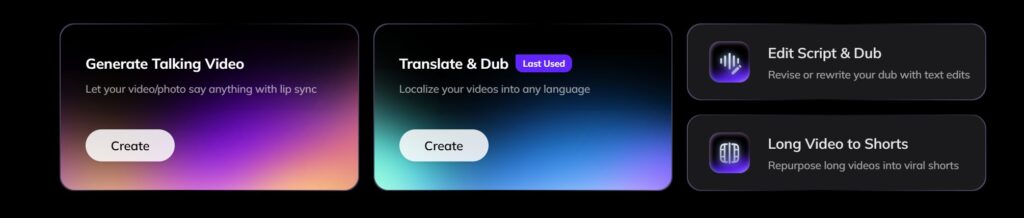
- Haga clic en el botón “Cree” en “Traducir y doblar”.
- Elige un archivo de vídeo de tu dispositivo o pega un enlace de vídeo.
- Espere a que se complete la carga.
- Asegúrate de que el formato de vídeo es compatible (por ejemplo, MP4, MOV).

Paso 3: Seleccionar la lengua de destino
Selecciona el idioma de destino entre los más de 160 idiomas compatibles con Vozo. Comprueba el idioma de origen detectado antes de generar la traducción.
- Elige el idioma al que quieres traducir tu vídeo.
- Revise el idioma de origen para asegurarse de que se detecta correctamente.
- Personaliza las preferencias lingüísticas si es necesario (por ejemplo, dialecto o tono).
Paso 4: Elige un modelo de clonación de voz

Elige VoiceREAL si lo que más te importa es la identidad del hablante y la emoción. Elige VoiceNATIVE si quieres que la voz doblada suene más natural en la lengua de destino. Si no estás seguro, utiliza la opción «Auto».
Paso 5: Revisar y corregir la transcripción traducida
- Compruebe la exactitud de la transcripción traducida automáticamente.
- Corrige los errores o ajusta el texto para que sea más legible.
- Utiliza las herramientas de edición de Vozo AI para revisar tu transcripción, añadir subtítulos e incluso volver a doblar tus vídeos.

Paso 6: Finalización y exportación del vídeo
- Comprueba el vídeo final con subtítulos y traducciones aplicados.
- Selecciona los ajustes de exportación, como el formato de archivo, la resolución o la colocación de los subtítulos.
- Descarga el vídeo terminado en tu dispositivo o compártelo directamente.
Para obtener instrucciones más detalladas, puede consultar la página de Vozo AI Centro de ayuda y tutoriales en YouTube.

También te puede gustar:
- Los mejores traductores de vídeo con IA
- Los mejores traductores de subtítulos de AI
- Las mejores aplicaciones de doblaje
Preguntas más frecuentes (FAQ)
¿Cuál es la mejor extensión de Chrome para traducir vídeos?
La mejor extensión de Chrome para traducir vídeos depende de para qué la vayas a utilizar. Para los subtítulos de YouTube, «Video CC Translator» y «Video Translator» son buenas opciones. Para los subtítulos en tiempo real, quizá te convengan más «iTour Video Translation» o «Maestra». Para vídeos traducidos listos para publicar con doblaje, clonación de voz y sincronización labial, Vozo es una opción más adecuada que una extensión de Chrome.
¿Qué es un traductor de subtítulos de vídeo?
Un traductor de subtítulos de vídeo traduce los subtítulos de un vídeo. Por lo general, funciona mejor cuando el vídeo ya incluye subtítulos o datos de transcripción.
¿Las extensiones de Chrome pueden traducir los subtítulos de YouTube?
Sí. Hay muchas extensiones de Chrome que pueden traducir los subtítulos o las leyendas de YouTube, pero la precisión y los idiomas compatibles varían. Algunas herramientas solo funcionan cuando ya hay leyendas disponibles.
¿Las extensiones de traducción de YouTube necesitan subtítulos ya existentes?
Algunas sí. Las extensiones basadas en subtítulos dependen de los subtítulos o los subtítulos ocultos de YouTube. Otras herramientas pueden transcribir primero el audio, pero la precisión depende de la calidad del audio original, el ruido de fondo, los acentos de los hablantes y la sincronización.
¿Se puede subtitular un vídeo de YouTube con una extensión de Chrome?
Algunas extensiones ofrecen funciones básicas de voz o doblaje, pero la mayoría están diseñadas para ver vídeos, no para crear contenidos de vídeo localizados. Para un doblaje completo, subtítulos editables, clonación de voz y sincronización labial, es más recomendable una herramienta de traducción de vídeo con IA específica, como Vozo.
¿Cuál es la diferencia entre una extensión de traducción de vídeos y Vozo?
Una extensión de traducción de vídeos ayuda a los espectadores a entender los vídeos directamente en el navegador. Vozo está pensada para creadores, profesionales del marketing, educadores y empresas que necesitan traducir, doblar, editar y publicar vídeos localizados.
