

Introdução
Atualizado em junho de 2026.
Está à procura de uma extensão do Chrome para traduzir vídeos ou de um tradutor de legendas para o YouTube? Este guia compara extensões de navegador capazes de traduzir legendas, legendas ocultas e páginas de vídeo, incluindo ferramentas para tradução de legendas do YouTube, legendas em tempo real, aprendizagem de línguas e dobragem básica. Se precisar de legendas editáveis e prontas para exportação, em vez de apenas legendas traduzidas no ecrã, uma ferramenta dedicada Tradutor de legendas com IA é mais adequado.
Também explicamos em que as extensões do Chrome ficam aquém e quando uma versão completa Tradutor de vídeo com IA uma ferramenta como o Vozo é a melhor opção.
O que é um tradutor de legendas de vídeo?
Um tradutor de legendas de vídeo é uma ferramenta que traduz as legendas de vídeos. A maioria das extensões do Chrome para tradução de legendas de vídeo funciona melhor quando o vídeo já tem legendas, legendas ocultas ou transcrições disponíveis. São úteis para ver tutoriais no YouTube, cursos online e vídeos em línguas estrangeiras, mas normalmente não criam um vídeo totalmente localizado com dublagem traduzida, clonagem de voz, sincronização labial ou legendas multilingues editáveis.
Resposta rápida: Qual é a melhor extensão do Chrome para traduzir vídeos do YouTube?
Para traduzir legendas e subtítulos do YouTube, o Video CC Translator e o Video Translator são as extensões do Chrome mais adequadas. Para legendas em tempo real e reuniões, o iTour Video Translation e o Maestra são opções mais eficazes. Para a aprendizagem de línguas, o Language Reactor é a melhor escolha.
Para criadores, profissionais de marketing, educadores e equipas que precisam de publicar vídeos traduzidos, o Vozo é a melhor opção. Para equipas de localização e fluxos de trabalho de produção voltados para o cliente, consulte o Vozo Plataforma de localização de vídeo com IA para agências. A partir de junho de 2026, Tradutor de vídeo Vozo suporta mais de 160 idiomas, legendas editáveis, dobragem com IA, clonagem de voz e sincronização labial precisa num fluxo de trabalho completo de localização de vídeo.
Os YouTubers que pretendem aumentar a sua audiência global podem utilizar um Fluxo de trabalho de localização de vídeos do YouTube em vez de depender apenas de extensões do Chrome baseadas em legendas.
Como escolhemos estas extensões do Chrome para tradução de vídeos
Avaliámos cada ferramenta com base em cinco critérios práticos:
- Tipo de tradução: tradução de legendas, legendas bilingues, transcrição em tempo real ou dobragem com IA.
- Compatibilidade com plataformas: compatibilidade exclusiva com o YouTube versus compatibilidade mais ampla com reuniões, cursos e outros sites de vídeo.
- Cobertura linguística: o número de línguas de origem e de destino suportadas.
- Qualidade do resultado: sincronização dos legendas, precisão da tradução, naturalidade da voz e qualidade da sincronização.
- Privacidade e controlo do fluxo de trabalho: permissões das extensões, tratamento de dados, opções de exportação e se o resultado é adequado para publicação.
| Ferramenta | Melhor para | Sinal da loja online atual | Tipo de tradução | Principal limitação |
|---|---|---|---|---|
| Tradutor de vídeo CC | Legendas dos cursos no YouTube, Udemy e Udacity | Classificação de 3,6, mais de 60 mil utilizadores | Tradução de legendas em CC | Requer legendas |
| Tradutor de vídeo | Tradução de vídeos com base em URL | Classificação de 3,0, mais de 80 mil utilizadores | Tradução de vídeo/voz | Classificação mais baixa; a qualidade deve ser verificada |
| Tradução de vídeos iTour | Legendas em tempo real para vídeos e reuniões | Classificação de 4,9, mais de 50 mil utilizadores | Legendas de áudio/vídeo em tempo real | Não para vídeos localizados prontos para exportação |
| Maestra | Transcrição e legendas no navegador | Classificação de 3,7, mais de 8 mil utilizadores | Transcrição/legendas em tempo real | Fluxo de trabalho pago; não é essencialmente uma ferramenta de dobragem |
| Reator de Linguagem | Aprendizagem de línguas no YouTube/Netflix | Classificação de 4,2, mais de 2 milhões de utilizadores | Legendas duplas / ferramentas de aprendizagem | Não se destina a criadores nem a editoras |
| Tradutor do YouTube e Dublagem de Vídeos do YouTube | Tradução do YouTube com base nas legendas | Classificação de 2,0, mais de 70 mil utilizadores | Funcionalidades de legendas e dublagem do YouTube | Requer legendas do YouTube; classificação baixa |
| SubTrans | Legendas bilingues em todos os sites | Classificação de 3,9, mais de 40 mil utilizadores | Tradução da legenda | Requer legendas oficiais ou legendas externas |
| DeepL | Tradução de textos e legendas | Classificação de 4,7, mais de 4 milhões de utilizadores | Tradução de texto/página | Não é um tradutor de vídeos completo |
| Tradutor de vídeo Vozo | Publicação de vídeos traduzidos | Mais de 160 idiomas, fluxo de trabalho completo | Tradução por IA, dobragem, legendas, clonagem de voz, sincronização labial | Não é uma extensão do Chrome |
1. Video CC Translator: a melhor extensão do Chrome para tradução de legendas de vídeo

Melhor para:
Alunos que necessitam de legendas traduzidas para cursos e palestras online.
O Video CC Translator destina-se à tradução de legendas em tempo real. A sua descrição na Chrome Web Store indica que é compatível com a Udemy, a Udacity e o YouTube, e que pode traduzir legendas utilizando o Google Translate e o DeepL. Além disso, suporta o modo de ecrã inteiro, o ajuste da posição das legendas e estilos de legendas personalizáveis.
Principais dados em junho de 2026:
| Caraterística | Detalhes |
| Classificação | 3,6/5 com base em 181 avaliações |
| Utilizadores | 60,000+ |
| Versão | 2.5.6 |
| Plataformas compatíveis | Udemy, Udacity, YouTube |
| Linguagens de interface de extensão | 11 idiomas |
| Privacidade | O desenvolvedor afirma que não recolhe nem utiliza dados |
| Loja virtual | Tradutor de vídeo CC |
Prós:
- Ótima opção para a tradução de cursos com legendas
- Funciona com a Udemy, a Udacity e o YouTube
- Suporta a personalização do estilo e o ajuste da posição das legendas
- Utiliza o Google Tradutor e o DeepL
Limitações:
- Depende da disponibilidade de legendas
- Não foi concebido para a dublagem por IA nem para a clonagem de voz
- Não é adequado para a produção de vídeos localizados para publicação
Veredicto:
Utilize o Video CC Translator se precisar principalmente de legendas traduzidas para vídeos de cursos. Se precisar de publicar conteúdos de formação multilingues, recorra a um fluxo de trabalho de localização completo, que inclui edição de transcrições, dobragem com IA, legendas e revisão.
2. Video Translator: a melhor extensão simples de tradução de vídeos para o YouTube
Melhor para:
Utilizadores ocasionais que pretendem traduzir vídeos a partir de URLs sem terem de criar um fluxo de trabalho de localização completo.
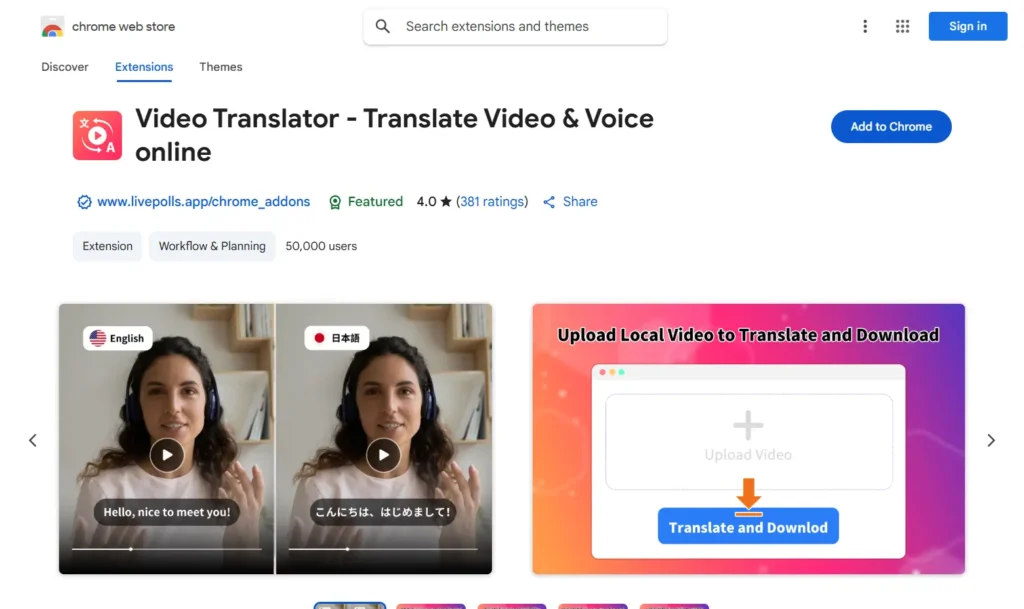
O Video Translator – Translate Video & Voice online apresenta-se como um tradutor de vídeo e voz baseado em IA. A sua descrição na Chrome Web Store indica que consegue traduzir vídeos para mais de 100 idiomas e suporta URLs de vídeo de plataformas como o Facebook, Instagram, Twitter, Vimeo, TikTok, Reddit e outros sites. No entanto, a sua classificação atual na Web Store é inferior à de várias alternativas, pelo que deve ser apresentado como uma opção básica e não como uma escolha profissional de topo.
Principais dados em junho de 2026
| Caraterística | Detalhes |
| Classificação | 3,0/5 com base em 226 avaliações |
| Utilizadores | 80,000+ |
| Versão | 4.8.10 |
| Cobertura de tradução declarada | Mais de 100 línguas |
| Linguagens de interface de extensão | 54 idiomas |
| Privacidade | O desenvolvedor afirma que não recolhe nem utiliza dados |
| Loja virtual | Tradutor de vídeo |
Prós:
- Funciona com URLs de vídeos de várias plataformas
- Vai além da simples tradução das legendas do YouTube
- Útil para testes rápidos de tradução
Limitações:
- Avaliação da Chrome Web Store inferior à de alternativas mais sólidas
- As alegações de qualidade devem ser tratadas com cautela, a menos que tenham sido testadas de forma independente
- Não é a solução ideal para equipas que necessitam de revisão, legendas, controlo do modelo de voz e localização pronta para exportação
Veredicto:
Utilize o Video Translator para testes básicos de tradução baseados em URL. Para a localização profissional de vídeos, utilize um fluxo de trabalho com transcrições editáveis, legendas, dublagem por IA, clonagem de voz e sincronização labial.
3. iTour Video Translation: a melhor extensão de tradução de vídeo em tempo real

Melhor para
Estudantes, alunos em cursos online e participantes em reuniões que necessitem de legendas traduzidas em tempo real enquanto assistem a vídeos ou participam em sessões ao vivo.
A iTour Video Translation é uma extensão do Chrome que traduz o áudio de vídeos ou reuniões da aba atual do navegador em legendas em tempo real. De acordo com a sua descrição na Chrome Web Store, pode ser utilizada para vídeos online e reuniões como o Zoom, Microsoft Teams, Google Meet, Webex e Canvas. Isto torna-a mais útil para a compreensão em tempo real do que para a produção de um vídeo traduzido final.
Principais dados em junho de 2026
| Caraterística | Detalhes |
| Classificação | 4,9/5 com base em 2 mil avaliações |
| Utilizadores | 50,000+ |
| Versão | 2.0.9 |
| Línguas | Suporte a vários idiomas |
| Preço | Versão de avaliação gratuita com compras na aplicação |
| Privacidade | A extensão gere o conteúdo do site |
| Loja virtual | Tradução de vídeos iTour |
Prós:
- Ideal para aulas ao vivo, palestras e reuniões
- Fluxo de trabalho de legendagem em tempo real
- Funciona para além do YouTube
Limitações:
- Ideal para ver e compreender, mas não para publicar vídeos localizados
- A qualidade da tradução depende da clareza do áudio original
- Não é um fluxo de trabalho completo para dublagem pronta para exportação, clonagem de voz, legendas e sincronização labial
Veredicto:
Utilize o iTour se precisar de legendas rápidas em tempo real para vídeos online ou reuniões. Recorra a um tradutor de vídeo totalmente baseado em IA, como o Vozo, quando precisar de publicar vídeos traduzidos com legendas editáveis, dobragem por IA, clonagem de voz e sincronização labial.
4. Maestra: A melhor opção para transcrição e legendas no navegador

Melhor para
Utilizadores que pretendem transcrição em tempo real e legendas traduzidas, integradas numa plataforma de transcrição mais abrangente.
A extensão do Chrome da Maestra capta o áudio das abas do navegador e fornece transcrição e legendas em tempo real. A descrição na Chrome Web Store indica que suporta transcrição e legendas em mais de 125 idiomas e guarda as sessões numa conta Maestra para edição posterior. Isto torna-a mais eficaz como ferramenta de transcrição e legendagem do que como uma extensão leve de tradução do YouTube com um único clique.
Principais dados em junho de 2026
| Caraterística | Detalhes |
| Classificação | 3,7/5 com base em 13 avaliações |
| Utilizadores | 8,000+ |
| Versão | 1.1.1 |
| Línguas | Mais de 125 idiomas para transcrição/legenda |
| Preço | Produto pago com uma versão gratuita |
| Privacidade | A extensão trata de informações pessoais identificáveis e do conteúdo do site |
| Loja virtual | Maestra AI |
Prós:
- Ideal para transcrição, legendas e sessões guardadas
- Suporta mais de 125 idiomas
- Liga a captura do navegador à plataforma web da Maestra
Limitações:
- Não é a opção mais barata para utilizadores ocasionais
- As melhores funcionalidades dependem do fluxo de trabalho da conta Maestra
- Não se destina principalmente a ser utilizado como um fluxo de trabalho completo de dobragem ou publicação com IA
Veredicto:
Utilize o Maestra se precisar de transcrição e tradução de legendas baseadas no navegador que se integrem a uma plataforma de edição mais abrangente. Se precisar de vídeos traduzidos com dublagem, clonagem de voz, sincronização labial e controlo de exportação, opte por um fluxo de trabalho completo de localização de vídeo.
5. Language Reactor: a melhor extensão de tradução do YouTube para a aprendizagem de línguas

Melhor para:
Estudantes de línguas que pretendem legendas bilingues, pesquisa no dicionário e controlos de reprodução.
O Language Reactor não é, essencialmente, uma ferramenta de localização de vídeos. Trata-se de uma extensão para a aprendizagem de línguas que permite ver conteúdos em língua original no YouTube e na Netflix. A descrição na Chrome Web Store indica que a extensão oferece legendas duplas, um dicionário pop-up, controlos de reprodução precisos e suporte para a aprendizagem através de filmes, séries, sites e texto importado.
Principais dados em junho de 2026:
| Caraterística | Detalhes |
| Classificação | 4,2/5 com base em 4,2 mil avaliações |
| Utilizadores | 2,000,000+ |
| Versão | 5.1.7 |
| Linguagens de interface de extensão | 27 idiomas |
| Preço | Gratuito com compras na aplicação / Funcionalidades Pro |
| Privacidade | Transparente, com conformidade com a política do programador. |
| Loja virtual | Reator de Linguagem |
Prós:
- Excelente para a aprendizagem de línguas
- Funciona com o YouTube e a Netflix
- As legendas duplas e a pesquisa no dicionário são úteis para o estudo
- Vasta base de utilizadores
Limitações:
- Não foi concebido para exportar vídeos traduzidos
- Não é uma ferramenta de dobragem ou clonagem de voz
- Mais adequado para alunos individuais do que para criadores ou equipas empresariais
Veredicto:
Utilize o Language Reactor se o seu objetivo for aprender uma língua enquanto assiste ao YouTube ou à Netflix. Não o apresente como um tradutor de vídeo profissional para criadores de conteúdo ou empresas.
6. Tradutor do YouTube e Dublagem de Vídeos do YouTube: A melhor opção para tradução de vídeos do YouTube com legendas

Melhor para:
Utilizadores que procuram um tradutor simples, exclusivo para o YouTube, quando já existem legendas disponíveis.
O YouTube Translator & YouTube Video Dubbing foi concebido especificamente para o YouTube. A descrição na Chrome Web Store indica que, atualmente, só é compatível com vídeos do YouTube que já tenham legendas. Se o botão «CC» do YouTube não estiver disponível ou estiver a cinzento, a tradução poderá não funcionar. A extensão também oferece dublagem sincronizada, legendas geradas por IA, vários estilos de voz e suporte para idiomas comuns.
Principais dados em junho de 2026:
| Caraterística | Detalhes |
| Classificação | 2,0/5 com base em 238 avaliações |
| Utilizadores | 70,000+ |
| Versão | 2.5.9 |
| Linguagens de interface de extensão | 55 idiomas |
| Preço | Compras na aplicação |
| Privacidade | O desenvolvedor afirma que não recolhe nem utiliza dados |
| Loja virtual | Tradutor do YouTube |
Prós:
- Concebido especificamente para o YouTube
- Suporta a tradução das legendas quando estas existem
- Inclui funcionalidades relacionadas com legendas e dobragem geradas por IA
Limitações:
- A Web Store do Chrome tem uma classificação baixa em comparação com outras opções
- Requer vídeos do YouTube com legendas
- Não adequado para vídeos sem legendas
- Não é um fluxo de trabalho completo de publicação para criadores ou equipas
Veredicto:
Utilize esta opção apenas se precisar de um tradutor simples de legendas do YouTube e o vídeo já tiver legendas. Para vídeos sem legendas ou para vídeos traduzidos prontos a publicar, utilize um tradutor de vídeo completo com IA.
7. SubTrans: a melhor extensão de tradução de legendas para cursos online

Melhor para:
Utilizadores que pretendem legendas bilingues e personalização das legendas em todos os sites de vídeo compatíveis.
O SubTrans é um conjunto de ferramentas para tradução de legendas. A descrição na Chrome Web Store indica que transforma legendas originais em legendas bilingues e é compatível com sites como o YouTube, a Udemy e a Coursera. Também permite utilizar ficheiros de legendas externos ou texto de legendas introduzido manualmente. O requisito principal é que o vídeo disponha de, pelo menos, uma fonte oficial de legendas ou legendas ocultas.
Principais dados em junho de 2026:
| Caraterística | Detalhes |
| Classificação | 3,9/5 com base em 119 avaliações |
| Utilizadores | 40,000+ |
| Versão | 5.0.0 |
| Linguagens de interface de extensão | 10 línguas |
| Preço | Grátis |
| Privacidade | A extensão trata de informações de identificação pessoal, de acordo com a declaração publicada na Chrome Web Store |
| Loja virtual | SubTrans |
Prós:
- Ideal para a exibição de legendas bilingues
- Suporta ficheiros de legendas externos
- Permite ajustar o estilo, a posição e a sincronização das legendas
- Funciona em vários sites de vídeo compatíveis
Limitações:
- Requer legendas oficiais já existentes ou uma fonte de legendas externa
- Não foi concebido para a dublagem por IA nem para a clonagem de voz
- Não foi concebido para exportar um vídeo totalmente localizado
Veredicto:
Utilize o SubTrans se precisar de exibir legendas bilingues e personalizar as legendas enquanto assiste. Recorra a um fluxo de trabalho completo de tradução de vídeo se precisar de áudio traduzido, clonagem de voz, sincronização labial, revisão e exportação.
8. DeepL: O melhor para traduzir legendas e páginas da Web

Melhor para:
Utilizadores que necessitam de traduções de texto de alta qualidade enquanto navegam, lêem ou escrevem.
O DeepL não é uma extensão do Chrome que traduz vídeos na íntegra. É mais adequado considerá-lo um assistente de tradução de texto, páginas e redação de alta qualidade. A descrição na Chrome Web Store indica que a extensão permite traduzir texto selecionado, traduzir páginas com o DeepL Pro, auxiliar na redação no Google Workspace e facilitar a comunicação em várias plataformas, incluindo o YouTube, o WhatsApp, o LinkedIn e o X.
Principais dados em junho de 2026:
| Caraterística | Detalhes |
| Classificação | 4,7/5 com base em 12,4 mil avaliações |
| Utilizadores | 4,000,000+ |
| Versão | 1.85.0 |
|
Apoio à tradução |
Mais de 30 línguas |
| Preço | Versão gratuita com limitações; as funcionalidades avançadas requerem o DeepL Pro ou o DeepL Write Pro |
| Privacidade | A DeepL afirma que os planos Pro não armazenam nem utilizam conteúdos para melhorar o serviço, a menos que o utilizador dê o seu consentimento; os conteúdos enviados gratuitamente podem ser utilizados para melhorar os algoritmos |
| Loja virtual | DeepL Tradutor de IA |
Prós:
- Tradução de texto de elevada qualidade
- Grande base de utilizadores e excelente classificação na Chrome Web Store
- Útil para traduzir transcrições, legendas, comentários e páginas da Web
Limitações:
- Não foi concebido para a dublagem de vídeos
- Não cria vídeos traduzidos prontos para exportação
- Não substitui a tradução de vídeo por IA, as legendas, a clonagem de voz ou a sincronização labial
Veredicto:
Utilize o DeepL quando precisar de uma tradução de texto precisa no âmbito de um fluxo de trabalho de vídeo. Não o apresente como um tradutor de vídeo completo. Para a produção de vídeos traduzidos, utilize uma ferramenta de tradução de vídeo específica.
9. Quando as extensões do Chrome não são suficientes: use o Vozo para uma tradução completa do vídeo
As extensões do Chrome são úteis quando se precisa apenas de compreender um vídeo enquanto o assiste. No entanto, nem sempre são suficientes quando é necessário publicar vídeos traduzidos, localizar conteúdos de formação, criar recursos de marketing multilingues ou preparar vídeos do YouTube para públicos internacionais.
A partir de junho de 2026, Tradutor de vídeo Vozo suporta mais de 160 idiomas e oferece tradução por IA, legendas editáveis, dobragem por IA, clonagem de voz e sincronização labial. No que diz respeito à clonagem de voz, o Vozo inclui o VoiceREAL para preservar a identidade vocal do locutor original e o VoiceNATIVE para criar dublagens mais naturais no idioma de destino em anúncios, tutoriais, vídeos de e-learning, vídeos explicativos de produtos e conteúdos de formação empresarial.
O Vozo agora suporta dois modelos de clonagem de voz em Tradução e Dublagem:
- VoiceREAL: ideal quando o mais importante é preservar a identidade, a emoção e a personalidade do orador original.
- VoiceNATIVE: ideal quando a voz traduzida deve soar natural na língua de destino, especialmente para anúncios, anúncios com conteúdo gerado pelo utilizador, tutoriais, cursos de e-learning, vídeos explicativos de produtos e vídeos corporativos.
Se não tiver a certeza de qual o modelo a utilizar, selecione «Auto» e deixe que o Vozo escolha o modelo mais adequado.
Prós e contras da utilização de extensões do Chrome para a tradução no YouTube
Prós
- Configuração rápida: a maioria das extensões pode ser instalada em segundos.
- Ideal para ver: útil quando só precisas de compreender um vídeo noutro idioma.
- Baixo custo: muitas ferramentas oferecem tradução de legendas gratuita ou em regime freemium.
- Fluxo de trabalho simplificado: não é necessário carregar nem exportar um vídeo.
Contras
- Controlo de publicação limitado: a maioria das extensões não foi concebida para exportar vídeos traduzidos com acabamento profissional.
- Dependência de legendas: muitas ferramentas funcionam melhor apenas quando já existem legendas.
- A qualidade da dobragem varia: a dobragem por IA, se disponível, pode não preservar a identidade do locutor nem o ritmo natural.
- Problemas de sincronização: as legendas ou a voz sintetizada podem ficar desfasadas em relação ao vídeo.
- Questões de privacidade: os utilizadores devem verificar as permissões da extensão antes de a instalarem.
- Controlo limitado da marca: as equipas necessitam normalmente de um glossário, revisão, legendas e definições de exportação que as extensões do navegador não oferecem.
Quando uma extensão do Chrome não chega: traduzir vídeos do YouTube com o Vozo
Passo 1: Iniciar sessão no Vozo AI
- Visite o Vozo AI site.
- Introduza o seu e-mail registado e a sua palavra-passe para iniciar sessão ou criar uma nova conta.
Passo 2: Carregar o seu vídeo (ou ligação)
Carregue o seu ficheiro de vídeo ou cole um link compatível. O Vozo suporta fluxos de trabalho comuns, como links do YouTube, Google Drive, TikTok, Zoom e Rumble.
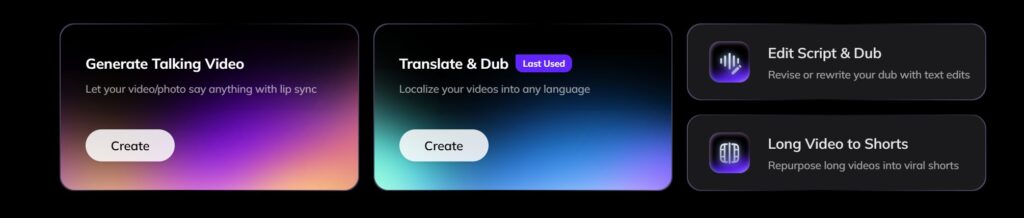
- Clique no botão “Criar” no botão “Traduzir e dublar”.
- Escolha um ficheiro de vídeo do seu dispositivo ou cole uma ligação de vídeo.
- Aguarde que o carregamento seja concluído.
- Certifique-se de que o formato de vídeo é suportado (por exemplo, MP4, MOV).

Passo 3: Selecionar o idioma de destino
Selecione o idioma de destino entre os mais de 160 idiomas suportados pelo Vozo. Verifique o idioma de origem detetado antes de gerar a tradução.
- Escolha a língua para a qual pretende traduzir o seu vídeo.
- Reveja a língua de partida para se certificar de que foi corretamente detectada.
- Personalizar as preferências de idioma, se necessário (por exemplo, dialeto ou tom).
Passo 4: Escolha um modelo de clonagem de voz

Escolha VoiceREAL se a identidade e a emoção do locutor forem o mais importante. Escolha VoiceNATIVE se quiser que a voz dublada soe mais natural na língua de destino. Se não tiver a certeza, utilize a opção «Auto».
Passo 5: Rever e ajustar a transcrição traduzida
- Verificar a exatidão da transcrição traduzida automaticamente.
- Editar eventuais erros ou ajustar o texto para melhor legibilidade.
- Utilize as ferramentas de edição do Vozo AI para rever a sua transcrição, adicionar legendas e até redublar os seus vídeos.

Passo 6: Finalização e exportação do seu vídeo
- Verificar o vídeo final com legendas e traduções aplicadas.
- Selecione as suas definições de exportação, como o formato de ficheiro, a resolução ou a colocação de legendas.
- Transfira o vídeo finalizado para o seu dispositivo ou partilhe-o diretamente.
Para obter instruções mais detalhadas, pode consultar o Centro de ajuda e tutoriais sobre YouTube.

Também pode gostar:
- Os melhores tradutores de vídeo com IA
- Os melhores tradutores de legendas de IA
- Melhores aplicações de dobragem de IA
Perguntas mais frequentes (FAQs)
Qual é a melhor extensão do Chrome para traduzir vídeos?
A melhor extensão do Chrome para tradução de vídeos depende do seu caso de utilização. Para legendas e subtítulos no YouTube, o Video CC Translator e o Video Translator são excelentes opções. Para legendas em tempo real, o iTour Video Translation ou o Maestra podem ser melhores. Para vídeos traduzidos prontos para publicação com dublagem, clonagem de voz e sincronização labial, o Vozo é uma opção mais adequada do que uma extensão do Chrome.
O que é um tradutor de legendas de vídeo?
Um tradutor de legendas de vídeo traduz as legendas ou os subtítulos de um vídeo. Normalmente, funciona melhor quando o vídeo já inclui legendas, subtítulos ou dados de transcrição.
As extensões do Chrome conseguem traduzir as legendas do YouTube?
Sim. Muitas extensões do Chrome permitem traduzir as legendas do YouTube, mas a precisão e o suporte linguístico variam. Algumas ferramentas só funcionam quando já existem legendas disponíveis.
As extensões de tradução do YouTube precisam de legendas já existentes?
Algumas sim. As extensões baseadas em legendas dependem das legendas ou das legendas ocultas do YouTube. Outras ferramentas podem transcrever o áudio primeiro, mas a precisão depende da qualidade do áudio original, do ruído de fundo, dos sotaques dos locutores e da sincronização.
É possível adicionar legendas a um vídeo do YouTube através de uma extensão do Chrome?
Algumas extensões oferecem funcionalidades básicas de voz ou dobragem, mas a maioria foi concebida para ver vídeos, e não para criar conteúdos de vídeo localizados. Para uma dobragem completa, legendas editáveis, clonagem de voz e sincronização labial, uma ferramenta dedicada de tradução de vídeo com IA, como o Vozo, é mais adequada.
Qual é a diferença entre uma extensão de tradução de vídeo e o Vozo?
Uma extensão de tradução de vídeos ajuda os espectadores a compreender os vídeos diretamente no navegador. O Vozo destina-se a criadores, profissionais de marketing, educadores e empresas que precisam de traduzir, dublar, editar e publicar vídeos localizados.
