

Einführung
Stand: Juni 2026.
Suchen Sie nach einer Chrome-Erweiterung zum Übersetzen von Videos oder einem Übersetzer für Untertitel auf YouTube? In diesem Leitfaden werden Browser-Erweiterungen verglichen, die Untertitel, Closed Captions und Videoseiten übersetzen können, darunter Tools für die Übersetzung von YouTube-Untertiteln, Echtzeit-Untertitel, das Sprachenlernen und einfache Synchronisation. Wenn Sie bearbeitbare, exportfertige Untertitel benötigen, anstatt nur auf dem Bildschirm angezeigte Übersetzungen, ist ein spezielles KI-Untertitelübersetzer passt besser.
Wir erklären auch, wo Chrome-Erweiterungen an ihre Grenzen stoßen und wann eine vollständige AI-Video-Übersetzer Ein Tool wie Vozo ist die bessere Wahl.
Was ist ein Video-CC-Übersetzer?
Ein Video-CC-Übersetzer ist ein Tool, das Untertitel aus Videos übersetzt. Die meisten Chrome-Erweiterungen für Video-CC-Übersetzer funktionieren am besten, wenn für das Video bereits Untertitel, Bildunterschriften oder Transkriptdaten verfügbar sind. Sie sind nützlich für das Ansehen von YouTube-Tutorials, Online-Kursen und fremdsprachigen Videos, erstellen jedoch in der Regel kein vollständig lokalisiertes Video mit übersetzter Synchronisation, Stimmklonung, Lippensynchronisation oder bearbeitbaren mehrsprachigen Untertiteln.
Kurzantwort: Was ist die beste Chrome-Erweiterung zur Übersetzung von YouTube-Videos?
Für die Übersetzung von YouTube-Untertiteln und Bildunterschriften sind „Video CC Translator“ und „Video Translator“ die relevantesten Chrome-Erweiterungen. Für Echtzeit-Untertitel und Besprechungen sind „iTour Video Translation“ und „Maestra“ die besseren Optionen. Zum Sprachenlernen eignet sich „Language Reactor“ besser.
Für Kreative, Marketingfachleute, Pädagogen und Teams, die übersetzte Videos veröffentlichen müssen, ist Vozo die bessere Wahl. Informationen zu Lokalisierungsteams und kundenorientierten Produktionsabläufen finden Sie bei Vozo unter KI-basierte Videolokalisierungsplattform für Agenturen. Stand Juni 2026, Vozo Video-Übersetzer unterstützt über 160 Sprachen, bearbeitbare Untertitel, KI-Synchronisation, Stimmklonen und präzise Lippensynchronisation im Rahmen eines umfassenden Lokalisierungsworkflows für Videos.
YouTuber, die ein weltweites Publikum gewinnen möchten, können eine Arbeitsablauf bei der Lokalisierung von YouTube-Videos anstatt sich ausschließlich auf Chrome-Erweiterungen zu verlassen, die auf Untertiteln basieren.
Wie wir diese Chrome-Erweiterungen für die Videoübersetzung ausgewählt haben
Wir haben jedes Tool anhand von fünf praktischen Kriterien bewertet:
- Übersetzungsart: Untertitelübersetzung, zweisprachige Untertitel, Echtzeit-Transkription oder KI-Synchronisation.
- Plattformunterstützung: Unterstützung ausschließlich für YouTube im Vergleich zu einer umfassenderen Unterstützung für Meetings, Kurse und andere Videoseiten.
- Sprachabdeckung: die Anzahl der unterstützten Ausgangs- und Zielsprachen.
- Ausgabequalität: Timing der Untertitel, Übersetzungsgenauigkeit, Natürlichkeit der Sprachwiedergabe und Synchronisationsqualität.
- Datenschutz und Workflow-Steuerung: Berechtigungen für Erweiterungen, Datenverarbeitung, Exportoptionen und die Frage, ob das Ergebnis zur Veröffentlichung geeignet ist.
| Werkzeug | Am besten für | Aktuelles Web Store Signal | Übersetzungstyp | Hauptbeschränkung |
|---|---|---|---|---|
| Video CC Übersetzer | Kursbeschreibungen auf YouTube, Udemy, Udacity | Bewertung: 3,6, über 60.000 Nutzer | Übersetzung der CC-Untertitel | Erfordert Untertitel |
| Video-Übersetzer | URL-basierte Videoübersetzung | 3,0 Sterne, über 80.000 Nutzer | Video-/Sprachübersetzung | Geringere Bewertung; Qualität sollte überprüft werden |
| iTour Video Übersetzung | Echtzeit-Untertitel für Videos und Besprechungen | 4,9 Sterne, über 50.000 Nutzer | Audio-/Video-Untertitel in Echtzeit | Nicht für exportfertige, lokalisierte Videos |
| Maestra | Browser-Transkription und Untertitel | Bewertung: 3,7, über 8.000 Nutzer | Echtzeit-Transkription/Untertitel | Kostenpflichtiger Workflow; nicht in erster Linie ein Synchronisationswerkzeug |
| Sprache Reactor | Sprachenlernen auf YouTube/Netflix | Bewertung: 4,2, über 2 Millionen Nutzer | Doppelte Untertitel / Lernhilfen | Nicht für Kreative oder Verlage |
| YouTube-Übersetzer & Synchronisation von YouTube-Videos | Übersetzung von YouTube-Videos anhand der Untertitel | Bewertung: 2,0, über 70.000 Nutzer | Untertitel- und Synchronisationsfunktionen auf YouTube | YouTube-Untertitel erforderlich; niedrige Bewertung |
| SubTrans | Zweisprachige Untertitel auf allen Websites | Bewertung: 3,9, über 40.000 Nutzer | Übersetzung des Untertitels | Erfordert offizielle Untertitel oder externe Untertitel |
| DeepL | Übersetzung von Texten und Untertiteln | 4,7 Sterne, über 4 Millionen Nutzer | Text-/Seitenübersetzung | Kein vollständiger Video-Übersetzer |
| Vozo Video-Übersetzer | Veröffentlichung übersetzter Videos | Über 160 Sprachen, vollständiger Workflow | KI-Übersetzung, Synchronisation, Untertitel, Stimmklonung, Lippensynchronisation | Keine Chrome-Erweiterung |
1. Video CC Translator: Die beste Chrome-Erweiterung für Video CC Translator

Am besten geeignet für:
Lernende, die übersetzte Untertitel für Online-Kurse und -Vorlesungen benötigen.
Video CC Translator ist auf die Übersetzung von Untertiteln in Echtzeit spezialisiert. Laut der Beschreibung im Chrome Web Store unterstützt die App Udemy, Udacity und YouTube und kann Untertitel mithilfe von Google Translate und DeepL übersetzen. Außerdem bietet sie einen Vollbildmodus, die Anpassung der Untertitelposition sowie anpassbare Untertitelformate.
Wichtige Fakten (Stand: Juni 2026):
| Merkmal | Einzelheiten |
| Bewertung | 3,6/5 bei 181 Bewertungen |
| Benutzer | 60,000+ |
| Version | 2.5.6 |
| Unterstützte Plattformen | Udemy, Udacity, YouTube |
| Sprachen für Erweiterungsschnittstellen | 11 Sprachen |
| Datenschutz | Der Entwickler gibt an, dass er keine Daten erfasst oder verwendet |
| Webshop | Video CC Übersetzer |
Vorteile:
- Besonders gut geeignet für die Übersetzung von Kursen auf der Grundlage von Bildunterschriften
- Funktioniert mit Udemy, Udacity und YouTube
- Unterstützt die Anpassung von Untertitel-Stil und -Position
- Verwendet Google Translate und DeepL
Beschränkungen:
- Hängt von den verfügbaren Untertiteln ab
- Nicht für KI-Synchronisation oder Stimmklonen ausgelegt
- Nicht geeignet für die Erstellung lokalisierter Videos zur Veröffentlichung
Fazit:
Verwenden Sie Video CC Translator, wenn Sie hauptsächlich übersetzte Untertitel für Kursvideos benötigen. Wenn Sie mehrsprachige Schulungsinhalte veröffentlichen möchten, nutzen Sie einen vollständigen Lokalisierungs-Workflow mit Transkriptbearbeitung, KI-Synchronisation, Untertiteln und Korrekturlesen.
2. Video Translator: Die beste einfache Erweiterung zur Videoübersetzung für YouTube
Am besten geeignet für:
Gelegenheitsnutzer, die Videos über URLs übersetzen möchten, ohne einen vollständigen Lokalisierungs-Workflow aufbauen zu müssen.
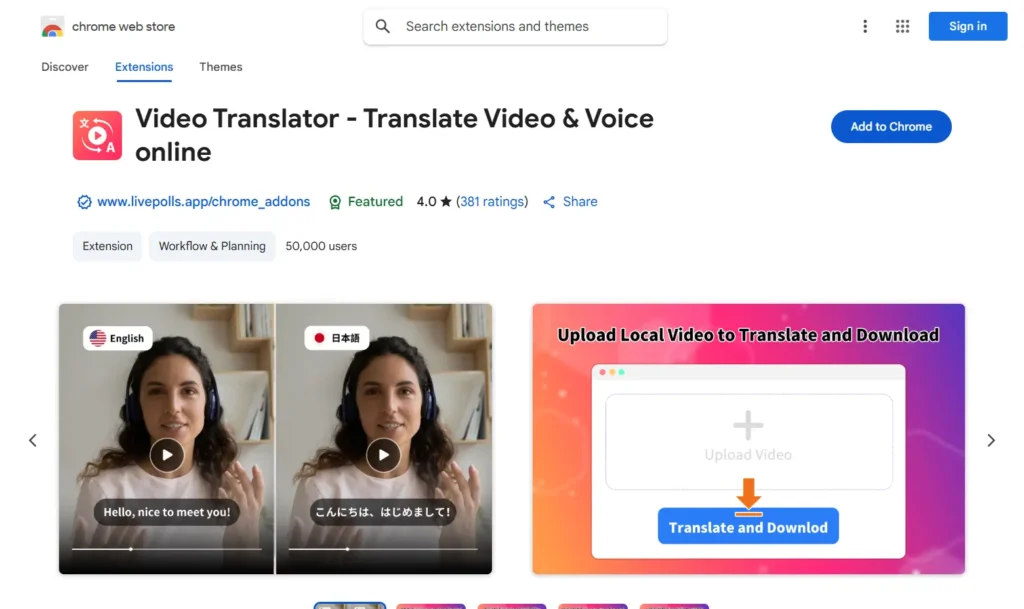
Video Translator – Translate Video & Voice online wird als KI-basierter Video- und Sprachübersetzer beworben. Laut der Beschreibung im Chrome Web Store kann das Tool Videos in über 100 Sprachen übersetzen und unterstützt Video-URLs von Plattformen wie Facebook, Instagram, Twitter, Vimeo, TikTok, Reddit und anderen Websites. Allerdings ist seine aktuelle Bewertung im Web Store niedriger als die einiger Alternativen, weshalb es eher als einfache Option denn als erstklassige professionelle Wahl präsentiert werden sollte.
Wichtige Fakten (Stand: Juni 2026)
| Merkmal | Einzelheiten |
| Bewertung | 3,0/5 bei 226 Bewertungen |
| Benutzer | 80,000+ |
| Version | 4.8.10 |
| Angegebene Übersetzungsabdeckung | 100+ Sprachen |
| Sprachen für Erweiterungsschnittstellen | 54 Sprachen |
| Datenschutz | Der Entwickler gibt an, dass er keine Daten erfasst oder verwendet |
| Webshop | Video-Übersetzer |
Vorteile:
- Unterstützt Video-URLs von verschiedenen Plattformen
- Geht über die einfache Übersetzung von YouTube-Untertiteln hinaus
- Nützlich für schnelle Übersetzungstests
Beschränkungen:
- Niedrigere Bewertung im Chrome Web Store als bei leistungsstärkeren Alternativen
- Qualitätsangaben sollten mit Vorsicht behandelt werden, sofern sie nicht unabhängig geprüft wurden
- Nicht ideal für Teams, die Korrekturlesen, Untertitel, die Steuerung von Sprachmodellen und eine exportfertige Lokalisierung benötigen
Fazit:
Verwenden Sie Video Translator für einfache, URL-basierte Übersetzungstests. Für die professionelle Videolokalisierung sollten Sie einen Workflow mit bearbeitbaren Transkripten, Untertiteln, KI-Synchronisation, Stimmklonierung und Lippensynchronisation nutzen.
3. iTour Video Translation: Die beste Erweiterung für die Videoübersetzung in Echtzeit

Am besten für
Studierende, Online-Lernende und Teilnehmer an Veranstaltungen, die beim Ansehen von Videos oder bei der Teilnahme an Live-Sitzungen auf in Echtzeit übersetzte Untertitel angewiesen sind.
iTour Video Translation ist eine Chrome-Erweiterung, die Video- oder Meeting-Audio vom aktuellen Browser-Tab in Echtzeit-Untertitel übersetzt. Laut der Beschreibung im Chrome Web Store kann sie für Online-Videos und -Meetings wie Zoom, Microsoft Teams, Google Meet, Webex und Canvas verwendet werden. Damit eignet sie sich eher zum Verständnis von Live-Inhalten als zur Erstellung eines fertigen, übersetzten Videos.
Wichtige Fakten (Stand: Juni 2026)
| Merkmal | Einzelheiten |
| Bewertung | 4,9/5 bei 2.000 Bewertungen |
| Benutzer | 50,000+ |
| Version | 2.0.9 |
| Sprachen | Mehrere Sprachen werden unterstützt |
| Preis | Kostenlose Testversion mit In-App-Käufen |
| Datenschutz | Die Erweiterung verwaltet Website-Inhalte |
| Webshop | iTour Video Übersetzung |
Vorteile:
- Ideal für Live-Kurse, Vorlesungen und Besprechungen
- Arbeitsablauf für Echtzeit-Untertitel
- Funktioniert auch außerhalb von YouTube
Beschränkungen:
- Am besten geeignet zum Ansehen und Verstehen, nicht zum Veröffentlichen lokalisierter Videos
- Die Qualität der Übersetzung hängt von der Klarheit des Original-Tonaufnahmes ab
- Kein vollständiger Workflow für exportfertige Synchronisation, Stimmklonierung, Untertitel und Lippensynchronisation
Fazit:
Verwenden Sie iTour, wenn Sie schnelle Echtzeit-Untertitel für Online-Videos oder Besprechungen benötigen. Nutzen Sie einen umfassenden KI-Videoübersetzer wie Vozo, wenn Sie übersetzte Videos mit bearbeitbaren Untertiteln, KI-Synchronisation, Stimmklonung und Lippensynchronisation veröffentlichen möchten.
4. Maestra: Die beste Lösung für Transkriptionen und Untertitel im Browser

Am besten für
Nutzer, die Live-Transkriptionen und übersetzte Untertitel wünschen, die mit einer umfassenderen Transkriptionsplattform verbunden sind.
Die Chrome-Erweiterung von Maestra nimmt Audio aus Browser-Tabs auf und bietet Transkriptionen sowie Untertitel in Echtzeit. Laut der Beschreibung im Chrome Web Store unterstützt sie Transkriptionen und Untertitel in über 125 Sprachen und speichert Sitzungen in einem Maestra-Konto zur weiteren Bearbeitung. Damit eignet sie sich besser für einen umfassenden Transkriptions- und Untertitel-Workflow als für eine einfache Ein-Klick-Erweiterung zur Übersetzung von YouTube-Videos.
Wichtige Fakten (Stand: Juni 2026)
| Merkmal | Einzelheiten |
| Bewertung | 3,7/5 bei 13 Bewertungen |
| Benutzer | 8,000+ |
| Version | 1.1.1 |
| Sprachen | Über 125 Sprachen für Transkription und Untertitelung |
| Preis | Kostenpflichtiges Produkt mit einem kostenlosen Einstiegspunkt für Erweiterungen |
| Datenschutz | Die Erweiterung verarbeitet personenbezogene Daten und Website-Inhalte |
| Webshop | Maestra AI |
Vorteile:
- Ideal für Transkriptionen, Untertitel und gespeicherte Sitzungen
- Unterstützt über 125 Sprachen
- Verbindet die Browser-Aufzeichnung mit der Webplattform von Maestra
Beschränkungen:
- Für Gelegenheitsnutzer nicht gerade die günstigste Option
- Die besten Funktionen hängen vom Arbeitsablauf des Maestra-Kontos ab
- Nicht in erster Linie als vollständiger KI-Workflow für die Synchronisation oder Veröffentlichung konzipiert
Fazit:
Verwenden Sie Maestra, wenn Sie eine browserbasierte Transkription und Untertitelübersetzung benötigen, die sich in eine umfassendere Bearbeitungsplattform integrieren lässt. Wenn Sie übersetzte Videoausgaben mit Synchronisation, Stimmklonung, Lippensynchronisation und Exportkontrolle benötigen, nutzen Sie einen vollständigen Workflow zur Videolokalisierung.
5. Language Reactor: Die beste YouTube-Übersetzungserweiterung zum Sprachenlernen

Am besten geeignet für:
Sprachlernende, die zweisprachige Untertitel, eine Wörterbuchfunktion und Wiedergabesteuerung wünschen.
Language Reactor ist in erster Linie kein Tool zur Videolokalisierung. Es handelt sich vielmehr um eine Erweiterung zum Sprachenlernen, mit der man Inhalte von Muttersprachlern auf YouTube und Netflix ansehen kann. Laut der Beschreibung im Chrome Web Store bietet die Erweiterung doppelte Untertitel, ein Popup-Wörterbuch, präzise Wiedergabesteuerung sowie Unterstützung beim Lernen anhand von Filmen, Serien, Websites und importierten Texten.
Wichtige Fakten (Stand: Juni 2026):
| Merkmal | Einzelheiten |
| Bewertung | 4,2/5 bei 4.200 Bewertungen |
| Benutzer | 2,000,000+ |
| Version | 5.1.7 |
| Sprachen für Erweiterungsschnittstellen | 27 Sprachen |
| Preis | Kostenlos mit In-App-Käufen / Pro-Funktionen |
| Datenschutz | Transparent, mit Einhaltung der Entwicklerrichtlinien. |
| Webshop | Sprache Reactor |
Vorteile:
- Sehr gut geeignet für das Sprachenlernen
- Funktioniert mit YouTube und Netflix
- Doppelte Untertitel und die Wörterbuchsuche sind beim Lernen hilfreich
- Große Nutzerbasis
Beschränkungen:
- Nicht für den Export übersetzter Videos vorgesehen
- Kein Tool zum Synchronisieren oder zum Klonen von Stimmen
- Eher für Einzelpersonen als für Kreative oder Geschäftsteams geeignet
Fazit:
Nutzen Sie Language Reactor, wenn Sie eine Sprache lernen möchten, während Sie YouTube oder Netflix schauen. Stellen Sie es nicht als professionellen Videoübersetzer für Content-Ersteller oder Unternehmen dar.
6. YouTube-Übersetzer & YouTube-Videovertonung: Am besten geeignet für die Übersetzung von YouTube-Videos anhand von Untertiteln

Am besten geeignet für:
Nutzer, die einen einfachen Übersetzer ausschließlich für YouTube suchen, wenn bereits Untertitel verfügbar sind.
„YouTube Translator & YouTube Video Dubbing“ wurde speziell für YouTube entwickelt. Laut der Beschreibung im Chrome Web Store unterstützt die Erweiterung derzeit nur YouTube-Videos, die bereits über Untertitel verfügen. Wenn die CC-Schaltfläche auf YouTube nicht verfügbar oder ausgegraut ist, funktioniert die Übersetzung möglicherweise nicht. Die Erweiterung verspricht außerdem synchronisierte Vertonung, KI-Untertitel, verschiedene Sprachstile und Unterstützung für gängige Sprachen.
Wichtige Fakten (Stand: Juni 2026):
| Merkmal | Einzelheiten |
| Bewertung | 2,0/5 bei 238 Bewertungen |
| Benutzer | 70,000+ |
| Version | 2.5.9 |
| Sprachen für Erweiterungsschnittstellen | 55 Sprachen |
| Preis | In-App-Käufe |
| Datenschutz | Der Entwickler gibt an, dass er keine Daten erfasst oder verwendet |
| Webshop | YouTube-Übersetzer |
Vorteile:
- Speziell für YouTube entwickelt
- Unterstützt die Übersetzung von Untertiteln, sofern diese vorhanden sind
- Enthält Funktionen im Zusammenhang mit KI-Untertiteln und Synchronisation
Beschränkungen:
- Geringe Bewertung im Chrome Web Store im Vergleich zu anderen Optionen
- Erfordert YouTube-Videos mit Untertiteln
- Nicht geeignet für Videos ohne Untertitel
- Kein vollständiger Veröffentlichungs-Workflow für Kreative oder Teams
Fazit:
Verwenden Sie diese Option nur, wenn Sie einen einfachen Übersetzer für YouTube-Untertitel benötigen und das Video bereits mit Untertiteln versehen ist. Für Videos ohne Untertitel oder für veröffentlichungsfertige übersetzte Videos sollten Sie einen umfassenden KI-Videoubersetzer verwenden.
7. SubTrans: Die beste Erweiterung zum Übersetzen von Untertiteln für Online-Kurse

Am besten geeignet für:
Nutzer, die zweisprachige Untertitel und die Möglichkeit zur individuellen Anpassung der Untertitel auf allen unterstützten Videoseiten wünschen.
SubTrans ist eine allgemeine Übersetzungssuite für Untertitel. Laut der Beschreibung im Chrome Web Store wandelt sie Originaluntertitel in zweisprachige Untertitel um und unterstützt Websites wie YouTube, Udemy und Coursera. Sie kann auch mit externen Untertiteldateien oder manuell eingegebenem Untertiteltext arbeiten. Die wichtigste Voraussetzung ist, dass das Video über mindestens eine offizielle Untertitel- oder Bildunterschriftenquelle verfügt.
Wichtige Fakten (Stand: Juni 2026):
| Merkmal | Einzelheiten |
| Bewertung | 3,9/5 bei 119 Bewertungen |
| Benutzer | 40,000+ |
| Version | 5.0.0 |
| Sprachen für Erweiterungsschnittstellen | 10 Sprachen |
| Preis | Kostenlos |
| Datenschutz | Laut den Angaben im Chrome Web Store verarbeitet die Erweiterung personenbezogene Daten |
| Webshop | SubTrans |
Vorteile:
- Gut geeignet für die Anzeige zweisprachiger Untertitel
- Unterstützt externe Untertiteldateien
- Ermöglicht die Anpassung von Stil, Position und Timing der Untertitel
- Funktioniert auf mehreren unterstützten Videoseiten
Beschränkungen:
- Es sind vorhandene offizielle Untertitel oder eine externe Untertitelquelle erforderlich
- Nicht für KI-Synchronisation oder Stimmklonen ausgelegt
- Nicht für den Export eines vollständig lokalisierten Videos vorgesehen
Fazit:
Verwenden Sie SubTrans, wenn Sie beim Anschauen zweisprachige Untertitel und die Möglichkeit zur individuellen Anpassung der Untertitel benötigen. Nutzen Sie einen vollständigen Video-Übersetzungs-Workflow, wenn Sie übersetzte Audiodaten, Stimmklonung, Lippensynchronisation, Überprüfung und Export benötigen.
8. DeepL: Am besten geeignet für die Übersetzung von Untertiteln und Webseiten

Am besten geeignet für:
Nutzer, die beim Surfen, Lesen oder Schreiben eine hochwertige Textübersetzung benötigen.
DeepL ist keine Chrome-Erweiterung, die Videos vollständig übersetzt. Man kann sie am besten als hochwertigen Übersetzungsassistenten für Texte, Webseiten und das Verfassen von Texten verstehen. Laut der Beschreibung im Chrome Web Store kann die Erweiterung ausgewählten Text übersetzen, Webseiten mit DeepL Pro übersetzen, beim Verfassen von Texten in Google Workspace helfen und die plattformübergreifende Kommunikation unter anderem auf YouTube, WhatsApp, LinkedIn und X unterstützen.
Wichtige Fakten (Stand: Juni 2026):
| Merkmal | Einzelheiten |
| Bewertung | 4,7/5 bei 12,4 Tausend Bewertungen |
| Benutzer | 4,000,000+ |
| Version | 1.85.0 |
|
Unterstützung bei der Übersetzung |
30+ Sprachen |
| Preis | Kostenlose Version mit Einschränkungen; für erweiterte Funktionen ist DeepL Pro oder DeepL Write Pro erforderlich |
| Datenschutz | DeepL gibt an, dass Pro-Tarife Inhalte nicht speichern oder zur Verbesserung des Dienstes nutzen, es sei denn, der Nutzer stimmt dem zu; kostenlos eingereichte Inhalte können zur Verbesserung der Algorithmen verwendet werden. |
| Webshop | DeepL AI-Übersetzer |
Vorteile:
- Hohe Qualität bei der Textübersetzung
- Große Nutzerbasis und hervorragende Bewertung im Chrome Web Store
- Nützlich für die Übersetzung von Transkripten, Untertiteln, Kommentaren und Webseiten
Beschränkungen:
- Nicht für die Videobearbeitung geeignet
- Erstellt keine exportfertigen, übersetzten Videos
- Kein Ersatz für KI-basierte Videoübersetzung, Untertitel, Stimmklonung oder Lippensynchronisation
Fazit:
Verwenden Sie DeepL, wenn Sie im Rahmen eines Video-Workflows präzise Textübersetzungen benötigen. Stellen Sie es nicht als vollwertigen Videoübersetzer dar. Verwenden Sie für übersetzte Videoinhalte ein spezielles Videoübersetzungstool.
9. Wenn Chrome-Erweiterungen nicht ausreichen: Nutzen Sie Vozo für die vollständige Übersetzung von Videos
Chrome-Erweiterungen sind nützlich, wenn Sie ein Video lediglich beim Anschauen verstehen möchten. Sie reichen jedoch nicht immer aus, wenn Sie übersetzte Videos veröffentlichen, Schulungsinhalte lokalisieren, mehrsprachige Marketingmaterialien erstellen oder YouTube-Videos für ein globales Publikum aufbereiten möchten.
Stand: Juni 2026, Vozo Video-Übersetzer unterstützt über 160 Sprachen und bietet KI-Übersetzung, bearbeitbare Untertitel, KI-Synchronisation, Stimmklonung und Lippensynchronisation. Für das Stimmklonen umfasst Vozo die Technologie VoiceREAL zur Erhaltung der Stimmidentität des Originalsprechers sowie VoiceNATIVE zur Erstellung natürlicherer Synchronisationen in der Zielsprache für Werbeanzeigen, Tutorials, E-Learning-Videos, Produktvideos und Inhalte für Unternehmensschulungen.
Vozo unterstützt nun zwei Modelle zur Stimmklonierung in „Übersetzen & Synchronisieren“:
- VoiceREAL: am besten geeignet, wenn es vor allem darauf ankommt, die Identität, die Emotionen und die Persönlichkeit des ursprünglichen Sprechers zu bewahren.
- VoiceNATIVE: besonders geeignet, wenn die übersetzte Stimme in der Zielsprache natürlich klingen soll, insbesondere bei Werbespots, UGC-Werbung, Tutorials, E-Learning-Kursen, Produktvideos und Unternehmensvideos.
Wenn Sie sich nicht sicher sind, welches Modell Sie verwenden sollen, wählen Sie „Auto“ und lassen Sie Vozo das am besten geeignete Modell auswählen.
Vor- und Nachteile der Verwendung von Chrome-Erweiterungen für die Übersetzung von YouTube-Videos
Profis
- Schnelle Einrichtung: Die meisten Erweiterungen lassen sich in Sekundenschnelle installieren.
- Gut zum Anschauen: nützlich, wenn man ein Video in einer anderen Sprache nur verstehen muss.
- Günstig: Viele Tools bieten eine kostenlose oder Freemium-Übersetzung von Untertiteln an.
- Einfacher Arbeitsablauf: Sie müssen kein Video hochladen oder exportieren.
Nachteile
- Eingeschränkte Veröffentlichungskontrolle: Die meisten Erweiterungen sind nicht dafür ausgelegt, professionell übersetzte Videos zu exportieren.
- Abhängigkeit von Untertiteln: Viele Tools funktionieren am besten, wenn bereits Untertitel vorhanden sind.
- Die Qualität der Synchronisation variiert: Bei einer KI-Synchronisation, sofern verfügbar, bleiben die Identität der Sprecher oder der natürliche Rhythmus möglicherweise nicht erhalten.
- Synchronisationsprobleme: Untertitel oder die generierte Sprachausgabe können vom Videomaterial abweichen.
- Datenschutzbedenken: Nutzer sollten vor der Installation die Berechtigungen der Erweiterung überprüfen.
- Eingeschränkte Kontrolle über die Markenidentität: Teams benötigen in der Regel Glossare, Überprüfungsfunktionen, Untertitel und Exporteinstellungen, die Browser-Erweiterungen nicht bieten.
Wenn eine Chrome-Erweiterung nicht ausreicht: YouTube-Videos mit Vozo übersetzen
Schritt 1: Anmeldung bei Vozo AI
- Besuchen Sie die Vozo AI Website.
- Geben Sie Ihre registrierte E-Mail-Adresse und Ihr Passwort ein, um sich anzumelden oder ein neues Konto zu erstellen.
Schritt 2: Hochladen Ihres Videos (oder Links)
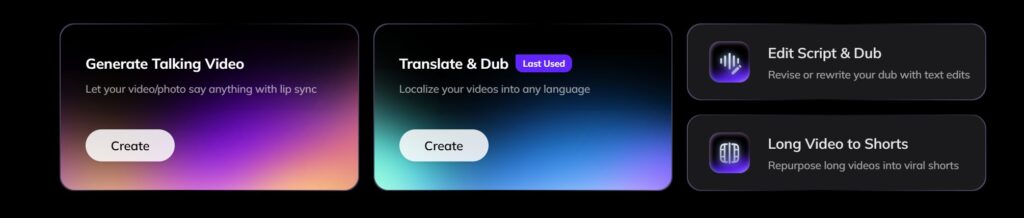
Lade deine Videodatei hoch oder füge einen unterstützten Link ein. Vozo unterstützt gängige Workflows wie Links zu YouTube, Google Drive, TikTok, Zoom und Rumble.
- Klicken Sie auf den “erstellen.”Klicken Sie auf “Übersetzen & Synchronisieren”.
- Wählen Sie eine Videodatei von Ihrem Gerät oder fügen Sie einen Videolink ein.
- Warten Sie, bis der Upload abgeschlossen ist.
- Stellen Sie sicher, dass das Videoformat unterstützt wird (z. B. MP4, MOV).

Schritt 3: Wählen Sie die Zielsprache
Wählen Sie Ihre Zielsprache aus den über 160 von Vozo unterstützten Sprachen aus. Überprüfen Sie die erkannte Ausgangssprache, bevor Sie die Übersetzung erstellen.
- Wählen Sie die Sprache, in die Ihr Video übersetzt werden soll.
- Überprüfen Sie die Ausgangssprache, um sicherzustellen, dass sie korrekt erkannt wird.
- Passen Sie bei Bedarf die Spracheinstellungen an (z. B. Dialekt oder Tonfall).
Schritt 4: Wählen Sie ein Modell zur Stimmklonung aus

Wählen Sie „VoiceREAL“, wenn die Identität und die Emotionen des Sprechers im Vordergrund stehen. Wählen Sie „VoiceNATIVE“, wenn die synchronisierte Stimme in der Zielsprache natürlicher klingen soll. Wenn Sie sich nicht sicher sind, wählen Sie „Auto“.
Schritt 5: Überprüfen und Anpassen des übersetzten Transkripts
- Überprüfen Sie die automatisch übersetzte Abschrift auf ihre Richtigkeit.
- Bearbeiten Sie eventuelle Fehler oder passen Sie den Text zur besseren Lesbarkeit an.
- Verwenden Sie die Bearbeitungswerkzeuge von Vozo AI, um Ihr Transkript zu überarbeiten, Untertitel hinzuzufügen und sogar Ihre Videos neu zu synchronisieren.

Schritt 6: Fertigstellen und Exportieren Ihres Videos
- Überprüfen Sie das fertige Video mit Untertiteln und Übersetzungen.
- Wählen Sie Ihre Exporteinstellungen wie Dateiformat, Auflösung oder Untertitelplatzierung.
- Laden Sie das fertige Video auf Ihr Gerät herunter oder teilen Sie es direkt.
Ausführlichere Anweisungen finden Sie in der Vozo AI Hilfe-Center und Tutorials auf YouTube.

Sie könnten auch mögen:
Häufig gestellte Fragen (FAQs)
Was ist die beste Chrome-Erweiterung für die Übersetzung von Videos?
Welche Chrome-Erweiterung für die Videoübersetzung am besten geeignet ist, hängt von Ihrem Anwendungsfall ab. Für YouTube-Untertitel und -Bildunterschriften sind „Video CC Translator“ und „Video Translator“ gute Optionen. Für Echtzeit-Untertitel sind „iTour Video Translation“ oder „Maestra“ möglicherweise die bessere Wahl. Für veröffentlichungsfertige, übersetzte Videos mit Synchronisation, Stimmklonung und Lippensynchronisation ist Vozo besser geeignet als eine Chrome-Erweiterung.
Was ist ein Video-CC-Übersetzer?
Ein Video-CC-Übersetzer übersetzt Untertitel oder Bildunterschriften aus einem Video. Er funktioniert in der Regel am besten, wenn das Video bereits Untertitel, Bildunterschriften oder Transkriptdaten enthält.
Können Chrome-Erweiterungen YouTube-Untertitel übersetzen?
Ja. Viele Chrome-Erweiterungen können YouTube-Untertitel übersetzen, doch die Genauigkeit und die Sprachunterstützung variieren. Einige Tools funktionieren nur, wenn bereits Untertitel vorhanden sind.
Benötigen YouTube-Übersetzungserweiterungen bereits vorhandene Untertitel?
Manche tun das. Untertitelbasierte Erweiterungen sind auf YouTube-Untertitel oder Untertitel für Hörgeschädigte angewiesen. Andere Tools können Audio zwar zunächst transkribieren, doch hängt die Genauigkeit von der Qualität des Ausgangsmaterials, Hintergrundgeräuschen, den Akzenten der Sprecher und dem Timing ab.
Kann eine Chrome-Erweiterung ein YouTube-Video synchronisieren?
Einige Erweiterungen bieten grundlegende Sprach- oder Synchronisationsfunktionen, doch die meisten sind für das Ansehen von Videos konzipiert und nicht für die Erstellung lokalisierter Videoinhalte. Für eine vollständige Synchronisation, bearbeitbare Untertitel, Sprachklonierung und Lippensynchronisation eignet sich ein spezielles KI-Videoubersetzungstool wie Vozo besser.
Was ist der Unterschied zwischen einer Video-Übersetzungserweiterung und Vozo?
Eine Videoübersetzungs-Erweiterung hilft Zuschauern dabei, Videos direkt im Browser zu verstehen. Vozo richtet sich an Content-Ersteller, Marketingfachleute, Pädagogen und Unternehmen, die lokalisierte Videos übersetzen, synchronisieren, bearbeiten und veröffentlichen müssen.
