

Overview
Vozo provides two voice cloning models in Translate & Dub:- VoiceREAL
- VoiceNATIVE
If you are unsure which model to use, select Auto. Vozo will automatically choose the most suitable model.
How to Select a Model
Before generation, select your preferred model under Voice Cloning Model.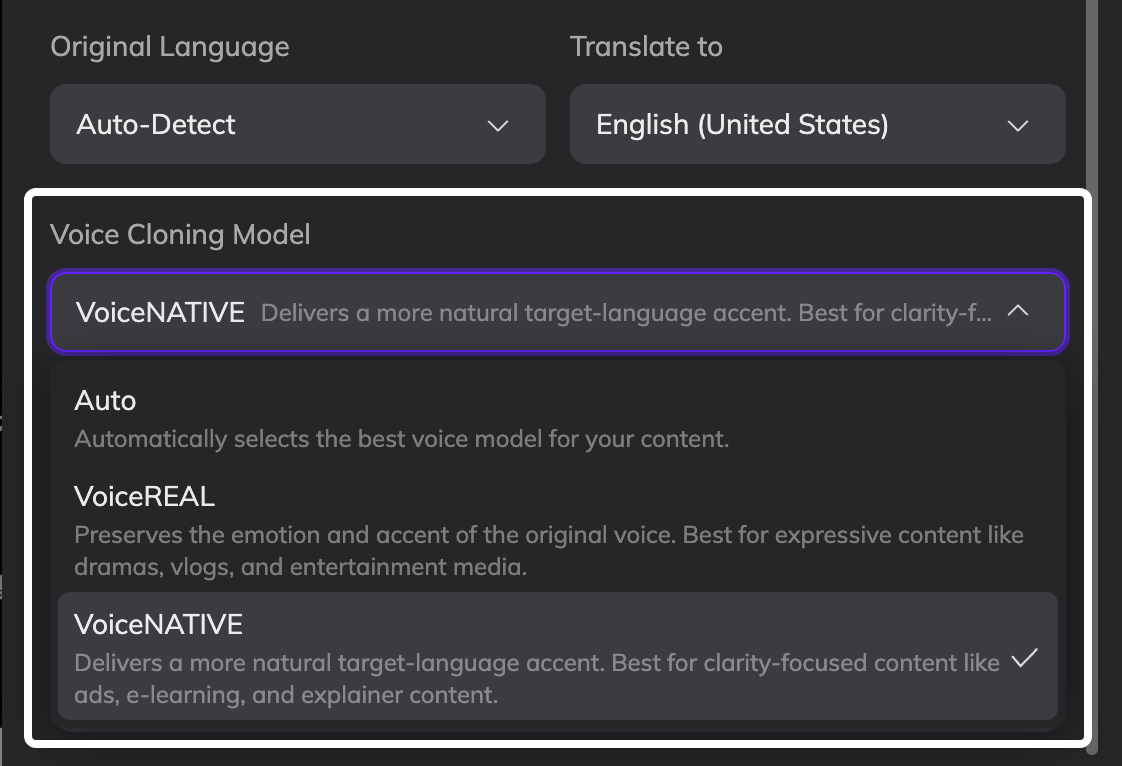
FAQ
Can I change the voice cloning model after generation?
Can I change the voice cloning model after generation?
No. The voice cloning model cannot be changed after generation.When a project is created, the selected voice cloning model is written into the project configuration. All future generations and regenerations within that project will continue using the same model.To use a different model, you need to:
- Re-upload the video or audio
- Select the correct voice cloning model
- Submit a new translation project
What happens if I use a voice from Voice Library?
What happens if I use a voice from Voice Library?
Voice cloning models only apply to cloned voices.If you select a system-provided preset voice from Voice Library, the voice will speak based on the languages and accents supported by that voice itself. It is not affected by the voice cloning model selected in your project.If you select a voice that you previously cloned, the voice will generate speech using the voice cloning model selected in your current project.
Which model will be used when translating a project into more languages?
Which model will be used when translating a project into more languages?
Newly added languages will use the same voice cloning model used in the original project.If the original project was set to Auto, the newly added languages will follow the model that Auto ultimately selected for that project.For example, if the original project used Auto and Vozo determined that VoiceREAL was the most suitable model, then newly added languages will also use VoiceREAL.If you want to use a different model for the new languages, please re-upload the video or audio and submit a new translation project.
What happens if I select a regional language variant like British English while using VoiceREAL?
What happens if I select a regional language variant like British English while using VoiceREAL?
For text translation, Vozo will use vocabulary, expressions, and speaking styles that match the selected regional variant.However, for dubbing, VoiceREAL preserves the original speaker’s accent and vocal characteristics. The generated voice may still sound closer to the original speaker’s accent rather than a fully native British English accent.If you want a more natural localized accent, we recommend using VoiceNATIVE.